Trees are the primary data object managed in the Tree Management module.
You can see all existing trees in the database on the Tree Management search page by clicking Trees under Objects.
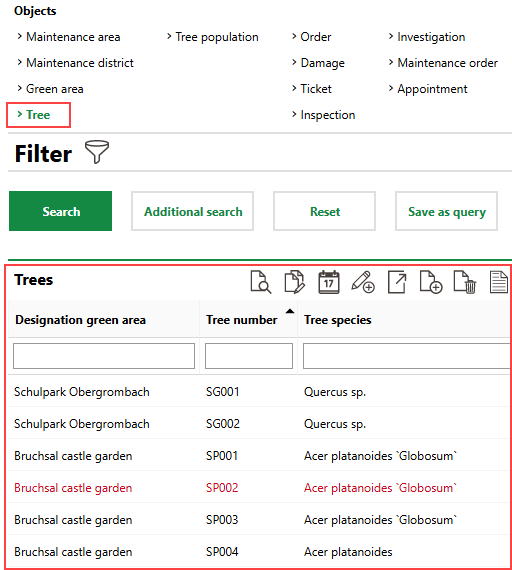
Trees on Tree Management Search Page
Details Page
Each tree in VertiGIS FM has its own details page, which you can access by double-clicking a tree on the Tree Management search page when Trees is selected under Objects.
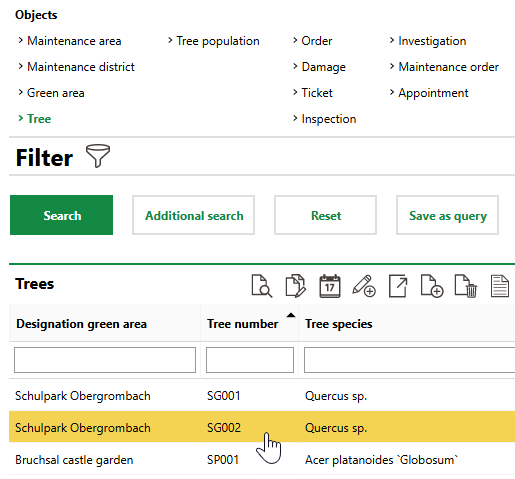
Navigating to a Tree's Details Page
The tree details page is divided into the sections below.
Tree
The Tree section stores the tree's basic high-level details.
Field |
Description |
||||||
|---|---|---|---|---|---|---|---|
Tree number |
A serial number or string to identify the tree by. |
||||||
Tree species |
The tree's species. Selectable options are stored in the Tree Type/Species catalog. |
||||||
Type |
A general category for the species of tree. VertiGIS FM populates this field with a value associated with the catalog entry selected in the Tree Species field. |
||||||
Green area |
The green area in which the tree is located. |
||||||
Inspection interval |
How frequently the tree should be inspected. Selectable options are saved in the Inspection Interval catalog. The value of this property is overwritten by any interval you select in the New Inspection Interval menu when you complete an inspection for the tree. |
||||||
Safety for Public Circulation |
Whether it is safe for the public to circulate near the tree. This field inherits the value selected in the Safety for Public Circulation field in the most recently completed inspection or completed investigation for the tree. |
||||||
Code |
A serial number or string assigned to the tree internally. Values in this field are often populated using configurations in the Number Ranges administration. |
||||||
Sort |
|
||||||
Common name |
A common name for the species of tree. VertiGIS FM populates this field with a value associated with the catalog entry selected in the Tree Species field. |
||||||
Stage of development |
The tree's stage of development. This field inherits the value selected in the Stage of Development field in the most recently completed inspection or completed investigation for the tree. |
||||||
Vitality |
The tree's overall health status. This field inherits the value selected in the Vitality field in the most recently completed inspection or completed investigation for the tree. |
||||||
Located |
Whether the tree has a corresponding GIS feature on an integrated web map. |
||||||
State |
The current state of the tree. This value is determined by the option selected in the State menu in the tree's most recent inspection. You can also update the tree's status to Cut by selecting a date in the Cut On field.
|
Basic Data
Field |
Description |
|---|---|
Estimated date of planting |
Whether the date selected in the Date of Planting field is an estimate or an exact date. |
Date of planting |
The date the tree was planted. |
Age at date of planting |
The tree's age when it was planted in its current location. |
Age in years |
The tree's age. |
Replacement planting for |
The tree that this tree replaced. In this field, you can select existing trees whose State is Cut. |
Cut on |
The date the tree was cut. Selecting a date in this field and saving the form when you edit the tree updates the tree's State to Cut. Refer to Cut and Replace Trees. |
Shape of crown |
The shape of the tree's crown. Selectable options are stored in the Shape of Crown catalog. The value of this property is overwritten by any interval you select in the State of Crown menu when you complete an inspection for the tree. |
Legal status |
The tree's legal status. Selectable options are saved in the Legal Status catalog. The value of this property is overwritten by any interval you select in the Legal Status menu when you complete an inspection for the tree. |
Location function |
A descriptor for the tree's specific location. Selectable options are saved in the Location Functional catalog. The value of this property is overwritten by any interval you select in the Location Function menu when you complete an inspection for the tree. |
Security expectation traffic |
The expected level of public circulation near the tree. Selectable options are saved in the Security Expectation Traffic catalog. The value of this property is overwritten by any interval you select in the Location Function menu when you complete an inspection for the tree. |
Accomplishment class |
|
Coordinate system |
The system in which the tree's coordinates are expressed (for example, WGS 84 or Gauss-Krüger). Selectable options are saved in the Coordinate System catalog. |
X / Longitude |
The x-coordinate (longitude) of the tree's location. |
Y / Latitude |
The y-coordinate (latitude) of the tree's location. |
Country |
The country in which the tree is located. Selectable options are activated in the Country Management administration. |
Street |
The street on which the tree is located. |
House number |
The street address of the tree's location. |
Zip Code |
The ZIP or postal code of the tree. |
City |
The city in which the tree is located. |
District |
The district, state, or province in which the tree is located. |
Tree cluster |
The tree cluster in which the tree is located, if applicable. |
Cadastral district |
The cadastral district in which the tree's land parcel is located. You can select a cadastral district saved in the system administration if your license does not include VertiGIS FM Parcel. |
Land parcel |
The land parcel on which the tree located. You can select a land parcel saved in the system administration if your license does not include VertiGIS FM Parcel. |
Real estate |
The real estate on which the tree is located. You can select a real estate saved in the system administration if your license does not include VertiGIS FM Buildings. |
Owner |
The owner of the tree. You must select a contact or company stored in the Contact Management module. |
Contact person |
A point of contact for the tree. You must select a contact or company stored in the Contact Management module. |
Access |
A description of the tree's accessibility to the public. Selectable options are saved in the Access catalog. |
Initial registration by |
The VertiGIS FM user who created the tree. |
Initial registration date * |
The date the tree was created in VertiGIS FM. |
Navigation
The Navigation section shows the tree's place in its VertiGIS FM Greenspaces hierarchy. This includes the maintenance district in which the tree is located, the maintenance area in which the maintenance district is located, and the green area in which the tree is located.
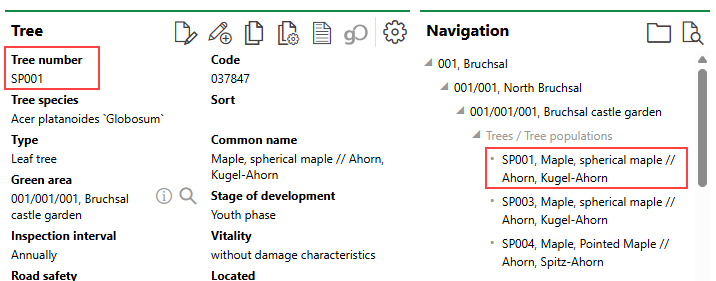
Tree in Navigation Section
You can double-click an asset or location in the Navigation section to navigate to its details page.
Current Tree Data
Data in the Current Tree Data section was captured during the most recently completed tree inspection. Often, there is no data in this section if no inspections have been completed for the tree.
You can click the Add Tree Data ( ) icon to enter relevant tree data in this section without completing an inspection.
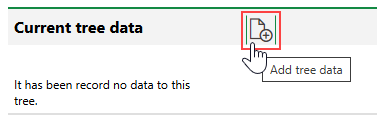
Add Tree Data
If there is already data in this section, the only way to update it is to complete an inspection.
Current Tree Data
Field |
Description |
|---|---|
Tree height [m] |
The height of the tree in meters, as determined by the most recently completed inspection of the tree. |
Crown diameter [m] |
The diameter of the tree's crown in square meters, as determined by the most recently completed inspection of the tree. |
Height of crown base [m] |
The height of the tree's crown from the ground, as determined by the most recently completed inspection of the tree. |
Trunk slant [°] |
The degree at which the tree's trunk slants in one direction, as determined by the most recently completed inspection of the tree. |
Number of trunks |
The number of trunks the tree has, as determined by the most recently completed inspection of the tree. |
Tree grate |
A description of the tree's grate or cover, if applicable, as determined by the most recently completed inspection of the tree. |
Sub Planting |
The description of the tree's sub-irrigation planting system, as determined by the most recently completed inspection of the tree. |
Stage of development |
The tree's stage of development, as determined by the most recently completed inspection of the tree. |
Vitality |
A description of the tree's vital status, as determined by the most recently completed inspection of the tree. |
Room Efficiency |
|
Equipment |
A check box to indicate whether equipment is attached to the tree. Describe the equipment attached to the tree in the accompanying text box. |
Entry Date |
The date the most recent inspection of the tree was completed (i.e., the Executed On date recorded in the inspection), or the date the data was otherwise entered. |
Typist |
The user who completed the most recent inspection of the tree. |
Trunk 1 Ø [cm] |
The diameter of the tree's first trunk in centimeters, as measured during the tree's last inspection. |
Trunk 1 circumference [cm] |
The circumference of the tree's first trunk in centimeters, as measured during the tree's last inspection. |
Trunk 2 Ø [cm] |
The diameter of the tree's second trunk in centimeters, as measured during the tree's last inspection. |
Trunk 2 circumference [cm] |
The circumference of the tree's second trunk in centimeters, as measured during the tree's last inspection. |
Trunk 3 Ø [cm] |
The diameter of the tree's third trunk in centimeters, as measured during the tree's last inspection. |
Trunk 3 circumference [cm] |
The circumference of the tree's third trunk in centimeters, as measured during the tree's last inspection. |
Trunk 4 Ø [cm] |
The diameter of the tree's fourth trunk in centimeters, as measured during the tree's last inspection. |
Trunk 4 circumference [cm] |
The circumference of the tree's fourth trunk in centimeters, as measured during the tree's last inspection. |
Trunk 5 Ø [cm] |
The diameter of the tree's fifth trunk in centimeters, as measured during the tree's last inspection. |
Trunk 5 circumference [cm] |
The circumference of the tree's fifth trunk in centimeters, as measured during the tree's last inspection. |
Tree Data History
The Tree Data History section lists the VertiGIS FM users who have entered data for this tree during. an inspection.
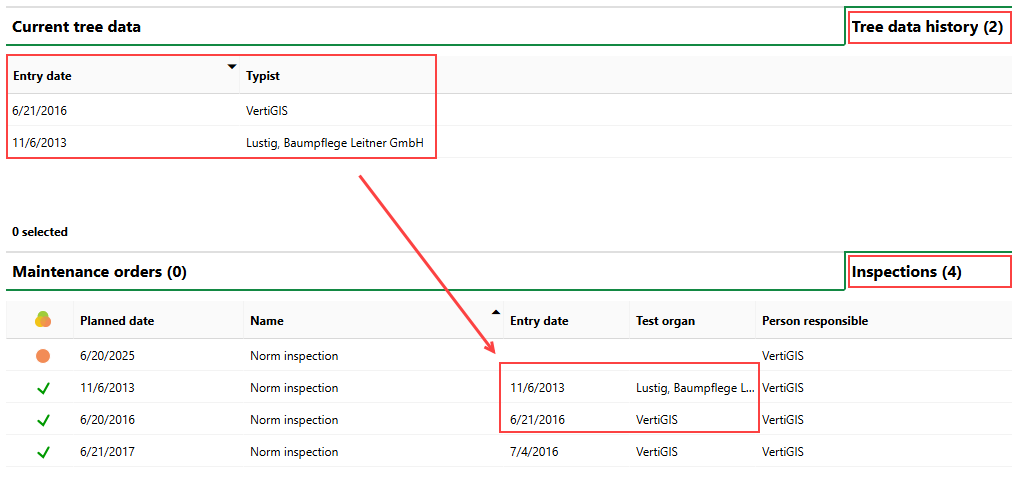
Tree Data History Entries Corresponding to Completed Inspections
The tree data entered during the most recent inspection is reflected in the Current Tree Data section.
Maintenance Orders
The Maintenance Orders section lists any past and upcoming orders created for the tree.
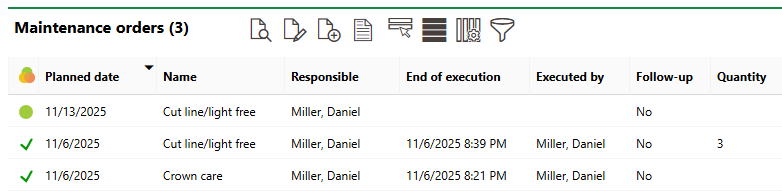
Maintenance Orders Section
For trees, all maintenance orders are manually created and assigned. Refer to Create and Complete Orders for Trees and Tree Clusters for more information.
Refer to Manage Orders, Inspections, and Investigations to understand the differences between the three in tree management.
Inspections
The Inspections section lists any past and upcoming inspections for the tree.

Inspections Section
Inspections with the "Norm Inspection" Name property are system-generated and scheduled for all trees in the database. Inspections marked "Additional Inspection" are manually created for the tree. Refer to Create and Complete Tree Inspections for more information.
Investigations
The Investigations section lists investigations scheduled for the tree. Refer to Create and Complete Tree Investigations for more information.
Investigations are manually created to investigate a possible issues with the tree. A tree tree often results in a tree order to resolve an issue confirmed by the investigation.
Land Parcels
The Land Parcels section lists the land parcels on which the tree's green area is located.
Damage History
The Damage History section lists issues with the tree that have been recorded during inspections.
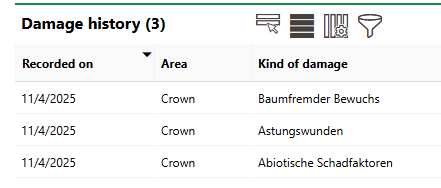
Damage History Section
Refer to Complete Inspections for more information.
Appointments
The Appointments section lists the scheduled appointments (a call or in-person meeting) that are associated with the tree. Appointments are action items that can be scheduled for any object in VertiGIS FM. They are not the same thing as orders.
To add an appointment for the tree, click the Add () icon in the Appointments section on the details page.
Notes
The Notes section lists notes that have been posted in relation to the tree.
Documents
The Documents section lists the documents, including image files, associated with the tree. Refer to Document Management for more information, including instructions on how to upload a document.