Vehicle components are parts, or individual instances of a component type in the Vehicle Component Structure.
For example, you could create one component type for five windshields made by the same manufacturer that have identical properties and the same product code, but all five windshields are different vehicle components, and each can be installed in a different vehicle in VertiGIS FM. Vehicle components are the lowest level of the Vehicle Component Structure.
Vehicle components are added to component types as inventory of the component. They can then be installed in vehicles in the Vehicle Structure and consequently marked as in-use.
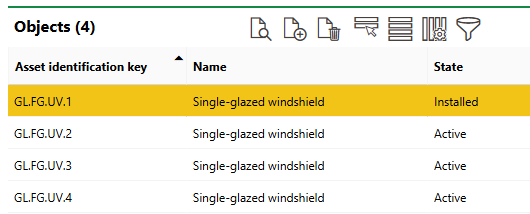
Objects Listed on the Type Details Page in the Vehicle Component Structure
Vehicle Component Details Page
You can access the vehicle component details page by double-clicking a vehicle component in the Objects section of the component type details page. It is divided into the sections below.
Component
The Component section stores the vehicle component's high-level details. You can edit this data when you edit the vehicle component's details.
Vehicle Component Details Page
Field |
Description |
|---|---|
The serial code that indicates the vehicle component's group, subgroup, and type in the Vehicle Structure. |
|
Name |
The name given to the vehicle component. By default, the name of the parent type is inherited, but this value can be edited. |
Serial number |
The serial number associated with the vehicle component. |
Barcode |
A field that can be used to parse a serial number using an external barcode scanner. |
Model no. |
The model number of the vehicle component. |
Installed at |
The vehicle that the vehicle component is installed in. This field is only visible if the vehicle component is installed in a vehicle. |
Mount Date |
The date the vehicle component was installed in the vehicle indicated in the Installed At field. This field is only visible if the vehicle component is installed in a vehicle. |
Stock location |
The warehouse where the vehicle component is stored when not installed in a vehicle. Selectable options are saved in the Storage section on the Tenant administration page (Administration > Own data > Tenant). |
Stock area |
The area within the warehouse selected in the Stock Location field. This field is only available if you have selected a location in the Stock Location menu. |
Stock place |
The area within the stock area selected in the Stock Area field. This field is only available if you have selected a location in the Stock Area menu. |
Type |
The vehicle component's component type. |
End of Service |
The date the vehicle component's assignment to the vehicle indicated in the Installed At field will end. |
State |
The state of the vehicle component. This field is only visible if the vehicle component is not installed in a vehicle. |
Reason |
The reason for the vehicle component's state (the reason it is not installed in a vehicle). Selectable options are stored in the Reason (component) catalog. This field is only visible if the vehicle component is not installed in a vehicle. |
Categorization
The Categorization section indicates the vehicle component's component type and, if it is not currently installed in a vehicle, its current State property.
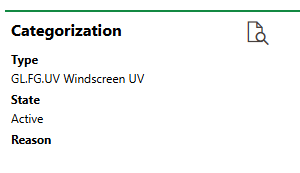
Categorization Section
Technical Characteristics
The Technical Characteristics tab stores the information below. To edit the information in this section, you must edit the vehicle component's details.
Technical Characteristics
Characteristic |
Description |
Example |
|---|---|---|
Model no. |
A serial number or product code for the vehicle component. |
1265-97378-12 |
Year of construction |
The year the vehicle component was manufactured. |
2021 |
Start-up Date |
The date the vehicle component has been in production since. |
3/1/2021 |
Estimate Service Life |
The estimated lifespan of the vehicle component. Refer to Estimate Service Life for more information. |
4 Year(s) |
Quantity |
The quantity of the components. This field could be used if, for example, an organization has hundreds of identical demo components but finds it sufficient to only create one instance of it in VertiGIS FM. |
500 |
Width [m] |
The width of the vehicle component in meters. |
0.15 |
Length (depth) [m] |
The length of the vehicle component in meters. |
0.4 |
Height [m] |
The height of the vehicle component in meters. |
1 |
Diameter [m] |
The diameter of the vehicle component in meters. |
0.2 |
Weight [kg] |
The weight of the vehicle component in kilograms. |
13.60 |
Power |
A power supply specification for the vehicle component. A range of units can be selected. |
1 kWh |
Description |
A description of the vehicle component. |
Generic carbon rod |
Estimated Service Life
It is important to enter the Estimated Service Life so that VertiGIS FM can calculate the market value of the product. Refer to Value in Commercial Characteristics for more information.
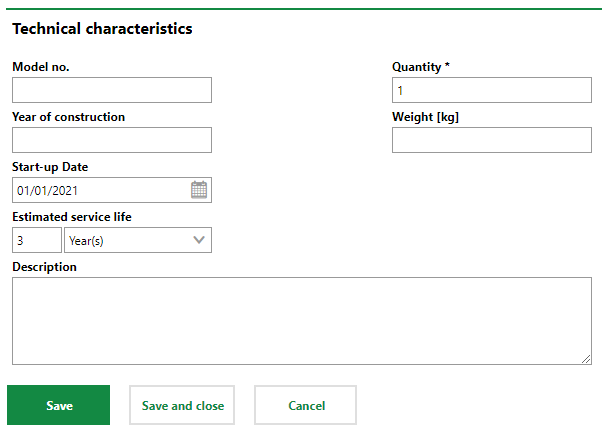
Technical Characteristics Tab on the Vehicle Component Details Page
Commercial Characteristics
The Commercial Characteristics tab stores the information below. To edit the information in this section, you must edit the vehicle component's details.
Commercial Characteristics
Characteristic |
Description |
Example |
|---|---|---|
Person responsible |
The person or organization responsible for the vehicle component. You must select a contact or company stored in the Contact Management module. |
Obermeyer |
Ownership |
The person or organization that owns the vehicle component. You must select a contact or company stored in the Contact Management module. |
VertiGIS |
Purchase price |
The price the vehicle component was purchased for. |
100 |
Date of purchase |
The date the vehicle component was purchased. |
06/04/2002 |
Actual cash value |
The cash value of the vehicle component. |
25 |
Cost Object |
The cost object associated with the vehicle component. Selectable options are stored in the Costs and Budget module. |
Services |
Cost center |
The cost center associated with the vehicle component. Selectable options are stored in the Costs and Budget module. |
|
Start Warranty |
The date the vehicle component's warranty started. |
2/14/2011 |
Duration Warranty |
The length of the vehicle component's warranty. |
2 Year(s) |
End of Warranty |
The date the vehicle component's warranty ends. |
2/13/2013 |
Manufacturer |
The organization that manufactured the vehicle component. You must select a company stored in the Contact Management module. |
Cisco |
Supplier |
The organization that supplied the vehicle component. You must select a company stored in the Contact Management module. |
Cisco |
Installer |
The party that installed the vehicle component. You must select a company stored in the Contact Management module. |
Artie Systems Ltd. |
Inventory number |
A serial number assigned to the vehicle component for tracking and identification. |
12345 |
Last stock-taking |
The last date the vehicle component was counted in inventory. |
06/04/2020 |
Comment |
Additional or miscellaneous information about the vehicle component. |
|
Warranty
The warranty fields can be used to set up warranty monitoring for the vehicle component. When you enter the Start Warranty and one of the Duration Warranty or End of Warranty fields and click Save, the third field populates based on the warranty data entered.
|
|
|
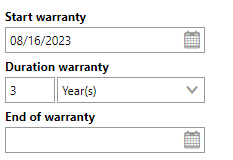
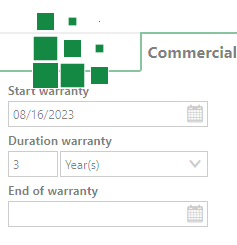
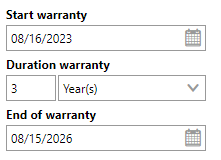
When you save the form with a valid warranty, the warranty expiration date displays on the vehicle component's details page.
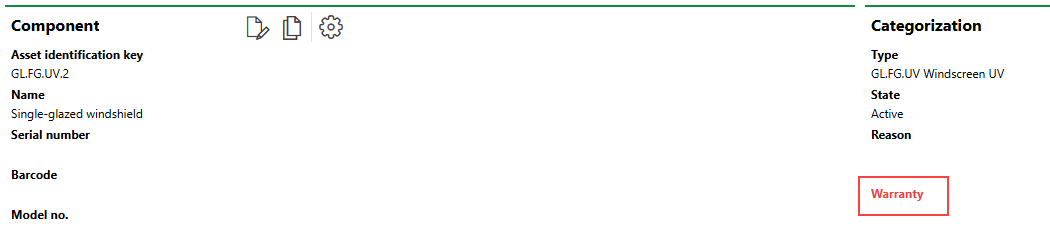
Warranty Expiry Warning on the Vehicle Component Details Page
Value
VertiGIS FM can calculate an estimated market value of the vehicle component in the Actual Cash Value field if you enter the Estimated Service Life value in the Technical Characteristics tab and the Purchase Price and Date of Purchase in the Commercial Characteristics tab. This feature allows you to make cost-sensitive decisions about the maintenance of the vehicle component: for example, you may decide that a damaged vehicle component that is no longer under warranty should not be repaired because the repair cost exceeds the value of the vehicle component.
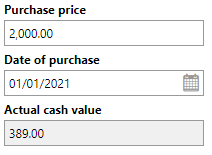
Actual Cash Value Property
Installation History
The Installation History section lists the vehicles the vehicle component has been installed in.

Installation History Section
Refer to Install Components in a Vehicle for more information.
Maintenance Strategies
The Maintenance Strategies section lists the maintenance strategies currently applied to the vehicle component. Refer to Maintenance Strategies for more information.
Orders
The Orders section lists scheduled orders for the vehicle component. These can be created manually as standalone events, or generated programmatically, as part of a maintenance strategy.
Refer to Orders for more information.
Appointments
The Appointments section lists the scheduled appointments (a call or in-person meeting) that are associated with the vehicle component. Appointments are action items that can be scheduled for any object in VertiGIS FM. They are not the same thing as orders.
To add an appointment for the vehicle component, click the Add ( ) icon in the Appointments section on the details page.
When an appointment is completed, it is converted to a note and shown in the Notes section.
Notes
The Notes section lists notes that have been posted in relation to the vehicle component.
Documents
The Documents section lists the documents, including image files, associated with the vehicle component. Refer to Document Management for more information, including instructions on how to upload a document.
Documents uploaded on the type details page are shown on the details page for all component objects added to the type.
If any of the sections described in this topic do not appear on the details page, you may need to edit the section authorization to show them.