Types are the grouping node above individual vehicle components and beneath the subgroup or the group in the Fleet Component Structure.
Types can be accessed from the Types section on the details page for the component group or component subgroup to which they were added.
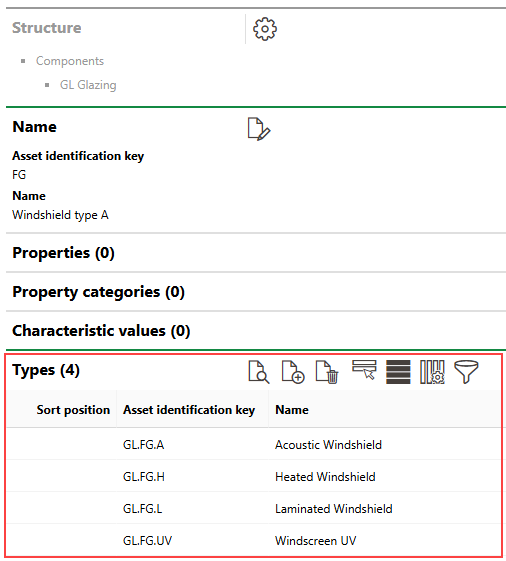
Types Listed in the Types Section on the Subgroup Details Page
To open a type's details page, double-click a type in the Types section of its group's or subgroup's details page. Alternatively, you can select the component type you want to open and click the View Details ( ) icon.
Component Version Details Page
The type details page includes the sections below.
Type
The Type section stores the component version's high-level details. You can change these properties when you edit the component version.
Field |
Description |
|---|---|
AKS |
The component version's asset identification key. Vehicle components in the component version will inherit this asset identification key with a decimal identifier at the end to distinguish them from each other. |
Name |
The name assigned to the component version. |
Sort position |
A field in which you can enter an alphanumeric value for sorting purposes. |
Stocked |
|
Default Values
The Default Values section stores properties that components added to this component version will inherit.
Default values are not applied to associated vehicle components that were added to the type before the these values were saved.
You can enter properties in these fields by expanding the Default Values section when you create or edit a type.
Default Values
Detail |
Description |
|---|---|
Width [m] |
The width in meters of this type's components. |
Length (depth) [m] |
The length in meters of this type's components. |
Height [m] |
The height in meters of this type's components. |
Diameter [m] |
The diameter in meters of this type's components. |
Weight [kg] |
The weight in kilograms of this type's components. |
Purchase price |
The purchase price of this type's components. |
Duration warranty |
The length of this type's devices. For this field, you must enter a number in the text box and then select Months or Years from the drop-down menu. |
Manufacturer |
The manufacturer of this type's components. You can select options stored in the Contact Management module. |
Supplier |
The supplier of this type's components. You can select options stored in the Contact Management module. |
Installer |
The installer of this type's components. You can select options stored in the Contact Management module. |
Description |
A description for this type's components. |
Properties
The Properties section lists the Additional Properties created for the component version. Additional Properties allow you to enter and store data in custom fields of any data type in the Additional Properties section on the device details, component details page, or vehicle details page for assets in the component version. Refer to Flexible Properties for more information.
Property Categories
The Property Categories section lists the Property Categories created for the component version. Property categories allow you to enter and store data in custom fields of any data type in a section with a custom name on the device details, component details page, or vehicle details page for assets in the component version. Refer to Flexible Properties for more information.
Characteristic Values
The Characteristic Values section lists the Characteristic Values created for the component version. Characteristic values allow you to enter and store multiple values in custom fields continually, on an ongoing basis, on the device details, component details page, or vehicle details page for assets in the component version. Refer to Flexible Properties for more information.
Work Sheets
The Work Sheets section lists the work sheets assigned to the component version. Work sheets assigned to a type can be attached to orders and maintenance strategy intervals for vehicle components in the component version. Refer to Work Sheets for more information. Refer to Add Work Sheets to a Component Version for instructions on how to add or assign a work sheet to a component version.
Maintenance Strategies
The Maintenance Strategies section lists the maintenance strategies currently applied to components in this component version. Maintenance strategies created for a maintenance strategy generate orders for all vehicles in the component version, unless otherwise specified. Refer to Maintenance Strategies for more information.
Damage Category
The Damage Categories section lists options that can be selected to describe damage when a user opens a service desk ticket associated with a component in this component version. Selectable options are saved in the Damage Symptoms catalog.
Objects
The Objects section lists the individual vehicle components within the component version.
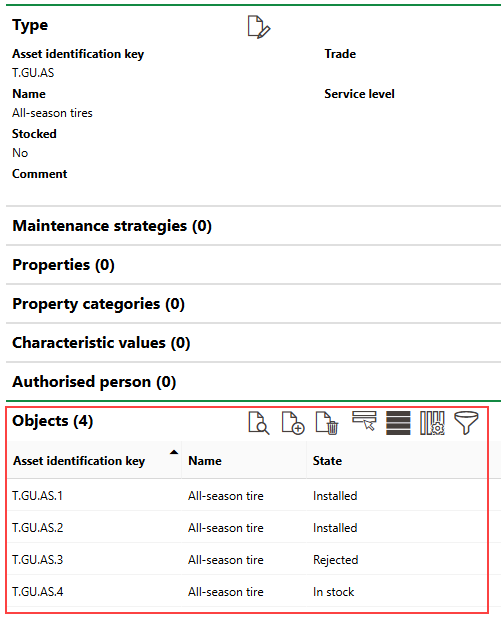
Objects Section
Double-click a component in this section to navigate to its details page.
Click the Add ( ) icon to add a new vehicle component to the type. Select a component and click the Delete (
 ) icon to delete it.
Checklists
The Checklists section lists the checklists assigned to the component version. Refer to Checklists and Apply Checklists to Component Version for more information.
Threshold Tables
The Threshold Tables section lists the threshold tables assigned to the component version. All threshold tables assigned to a component version must be created on the group details page for the group containing the component version. If a threshold table is assigned to a component version, it can be used to register measurement data for components within the component version.
Refer to Threshold Tables for more information.
Authorised Person
The Authorised Person section lists individuals authorized to work with components in this component version. This feature is used in conjunction with the VertiGIS FM Health and Safety module.
If any of the sections described in this topic do not appear on the details page, you may need to edit the section authorization to show them.