Checklists are lists of tasks or conditions a user in the field must mark as complete or unable to be completed for an asset. Checklist functionality varies depending on the VertiGIS FM product in which the asset associated with the checklist is managed.
In VertiGIS FM Maintenance and VertiGIS FM Buildings, you can assign checklists to maintenance strategies that generate orders for a device, component, building, or building construction. Users in the field must mark all of the items in the checklist as complete or unable to be completed before they can complete the order. In some VertiGIS FM products in which assets are managed, like VertiGIS FM Buildings, VertiGIS FM Contracts, and VertiGIS FM Parcel, you can assign a checklist directly to an asset. These kinds of checklists are not associated with an order and can only be completed once.
Documentation about checklist use with other VertiGIS FM modules will be available in the future.
Field |
Description |
|---|---|
Order checklist |
Assigned to maintenance strategy intervals. A user must complete the checklist before they can close orders generated by the maintenance strategy. Order checklists are managed in the Order Checklists section on the checklist administration page. |
Asset checklist |
Assigned directly to an asset. This checklist can only be completed once for each asset to which it is assigned. Asset checklists are managed in the Checklists section on the checklist administration page. |
Land transaction checklist |
Assigned directly to a land transaction in VertiGIS FM Parcel. This checklist can only be completed once for each land transaction to which it is assigned. Land transaction checklists are managed in the Land Transaction Checklist section on the checklist administration page. |
Checklist Functionality by VertiGIS FM Product
Product |
Asset |
Checklist Type(s) |
Checklist Creation and Assignment |
|---|---|---|---|
VertiGIS FM Maintenance |
All assets managed in the Device and Systems Structure or the Component Structure. |
Order checklist (checklist must be completed to close orders associated with the asset) |
•Created globally and applied to the device's or component's type, then applied to maintenance strategies created for the type. •Created locally for the device's or component's type, then applied to maintenance strategies created for the type. |
VertiGIS FM Buildings |
Real estates, buildings, floors, rooms, building construction groups |
•Order checklist (can be applied to time-based maintenance intervals for all building assets) •Asset checklist (applied to buildings only) |
•Created globally and applied to a building or building construction group. •Created locally for the device's or component's type. |
Rental Management module (included in VertiGIS FM Contracts) |
•Inspection checklist (called order checklists in the user interface), applied to inspection strategies for rental agreement inspections •Asset checklist (checklist applied to a rental agreement is completed once) |
•Created globally and applied to a rental agreement inspection. •Created globally and applied to a rental agreement. |
|
VertiGIS FM Parcel |
Asset checklist (checklist applied to a land parcel completed once) |
Created globally and assigned directly to a land parcel. |
Checklist Administration Page
All VertiGIS FM products whose assets can have a checklist applied to them have a checklist administration page that stores the product's global checklists and checklist categories.
A global checklist refers to a checklist that can be assigned to multiple assets managed in a single VertiGIS FM product (for example, VertiGIS FM Maintenance). A local checklist is a checklist created uniquely for a device or component type (VertiGIS FM Maintenance) or for an individual asset managed in another VertiGIS FM product.
Users with administrative privileges can access the checklist administration pages from anywhere in VertiGIS FM by clicking Administration > Master Data > Checklists, and then double-clicking the VertiGIS FM product whose administration page they want to open.
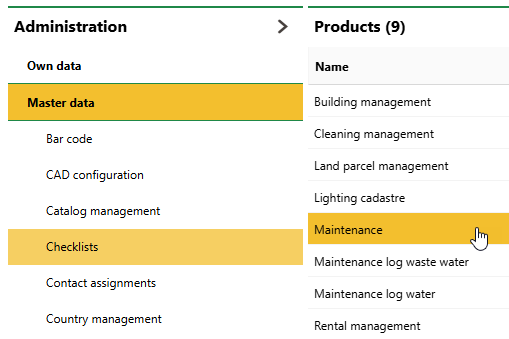
Checklist Administration Page
Depending on the VertiGIS FM product you click above, the checklist administration page may include the sections below.
Order Checklists
The Order Checklists section lists the global order and inspection checklists (checklists that can be applied to orders used in the product).
Items
The Items sections lists existing checklist items (conditions or tasks that must be checked) that can be added to order checklists. Instead of manually creating new items to add to checklists, you can reuse existing items in this section in multiple order checklists. This section and the related functionality is only available for VertiGIS FM Maintenance.
Global Categories
The Global Categories section lists the categories into which checklists associated with the VertiGIS FM product are sorted. Examples could include cleaning, security, and hazard prevention.
Checklist Details Page
Each checklist in VertiGIS FM has its own details page. You can access a checklist's details page by double-clicking it on the checklist administration page or in the Checklists section on the details page of an asset to which it is applied.
Checklist details pages include the sections and details below.
Checklist
This Checklist section reflects high-level information about the checklist.
Category |
Description |
Example |
|---|---|---|
Category |
The category of the checklist. Selectable options are stored in the Global Categories section on the checklist administration page for the VertiGIS FM product or module. |
Hygiene inspection |
Number |
A number or code assigned to the checklist for sorting purposes. |
HygInsp 430-15 |
Global |
Whether the checklist is global. A checklist is global if it was created on the checklist administration page (Administration > Master data > Checklists). A checklist is not global if it was created specifically for a type on the type's details page. |
Yes No |
Name |
The name given to the checklist. |
Silencer |
Kind of inspection |
The type of inspection that will include the checklist. The employee assigned the inspection must complete any required items in the checklists assigned the category. This field only appears on forms to create or edit order checklists and is not associated with asset checklists. This functionality is associated with the condition assessment module. Do not select an option in this field if you want to assign the checklist to maintenance strategies. •For Building Management inspection checklists, selectable options are saved in the Kind of Inspection catalog. •For Rental Management inspection checklists, selectable options are hard-coded: you can select Initial Condition Report "Delivery") for move-in inspections or Exit Condition Report ("Remittance") for inspections that occur at the end of a tenancy. |
Property security Condition / investments |
Items
The Items section lists the individual items (tasks or conditions) that can be checked by users who complete the checklist. Items that have a Required property of Yes must be completed to complete their associated checklists or associated orders or inspections.
The table indicates the checklist items, a short description of each item, whether the item is mandatory, and any notes associated with the task.
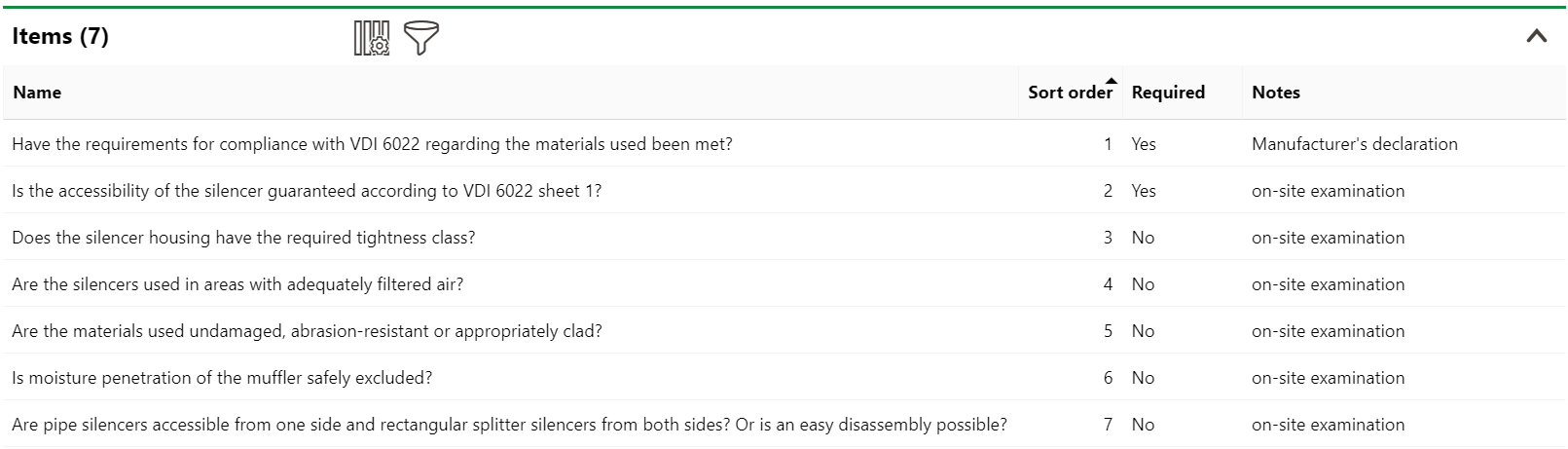
Items Section on the Checklist Details Page
Refer to the Create Checklists topic for instructions on how to add tasks to various kinds of checklists.