Cylinders are mechanisms that keys fit into to unlock locks. In VertiGIS FM, a cylinder is added to individual locks and assigned to doors to establish a link between the lock and the door.
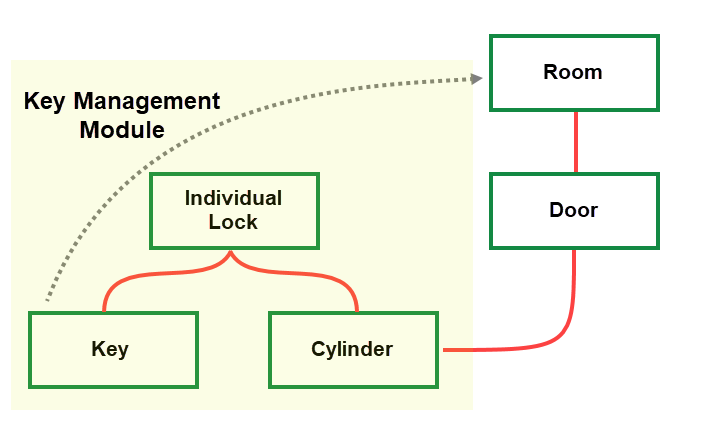
Key Management Assets Associated with a Door in VertiGIS FM
Details Page
Each cylinder in VertiGIS FM has its own details page. You can access a cylinder's details page
•on the Key Management search page, by clicking Cylinder under Objects and then double-clicking a cylinder in the search grid.
•on the details page for the individual lock in which the cylinder is installed or the door associated with the cylinder, by double-clicking a cylinder in the Cylinder section.
Each cylinder details page has the information fields and sections outlined below.
Cylinder
The Cylinder section stores the cylinder's high-level properties.
Field |
Description |
||||||||||
|---|---|---|---|---|---|---|---|---|---|---|---|
Number |
A name for the cylinder for identification purposes. |
||||||||||
Name |
A name for the cylinder. |
||||||||||
State |
The cylinder's current status.
You cannot change the status of a cylinder while it is installed in a door. |
||||||||||
Depth A [mm] |
The depth of the cylinder's keyhole in millimeters. |
||||||||||
Depth B [mm] |
The depth of the cylinder's secondary keyhole in millimeters, or of other keyholes on the cylinder. |
||||||||||
Type |
The type of cylinder. Selectable options are saved in the Type of Cylinder catalog. |
||||||||||
Protection |
The type of components used to protect the cylinder. Selectable options are saved in the Cylinder Protection catalog. |
||||||||||
Installation Direction |
How to install the cylinder. Selectable options are saved in the Cylinder Installation Direction catalog. |
||||||||||
End of Service |
The date the cylinder should be taken out of service. |
Door/Gate
The Door/Gate section lists the door or gate the cylinder is installed in.
Refer to Assign a Cylinder to a Door or Gate.
Key
The Key section lists the keys that unlock locks and doors associated with the cylinder.
For a cylinder, the Key section lists keys assigned to the individual lock associated with the door, as well as keys assigned to group locks or central locks above the individual lock in its locking system hierarchy. Refer to Create a Key for a Lock.
Tickets
The Tickets section lists any service desk tickets associated with the cylinder.
Documents
The Documents section lists the documents, including image files, associated with the cylinder. Refer to Document Management for more information, including instructions on how to upload a document.