Locking system hierarchies specify superior or subordinate relationships between locks in a locking system. A key can open locks with subordinate relationships to the lock the key is assigned to.
Locking systems can comprise central locks, group locks, and individual locks and must conform to the logic below:
•Central locks represent the master level lock in a locking system. Central lock keys can open subordinate group locks, individual locks beneath the subordinate group locks, or individual locks with direct subordinate relationships to the central lock.
•Group locks are associated with groups of individual locks, and a key assigned to a group lock opens the individual locks in the group. Group locks have subordinate relationships to central locks and superior relationships to individual locks. You can add additional levels to a locking system hierarchy by adding subordinate or superior group locks to another group lock's hierarchy.
•Individual locks open a single door. Individual locks in the same group all have subordinate relationships to the same group lock. Individual locks can also have direct subordinate relationships to central locks or exist in a locking system without central or group locks.
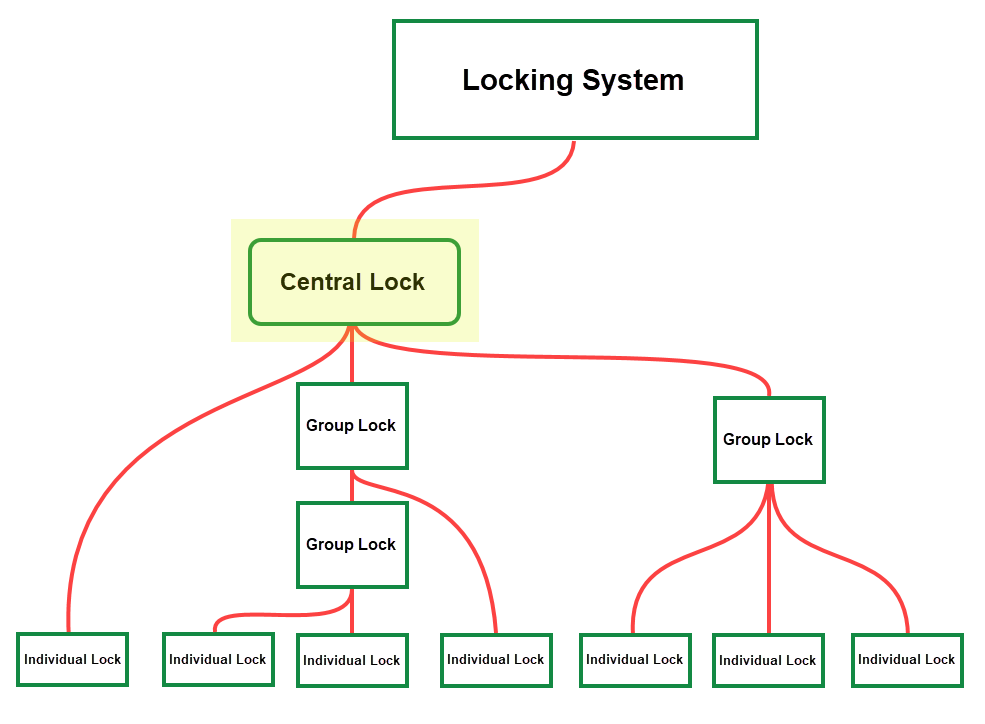
Possible Locking System Hierarchies
Additionally, individual locks can have subordinate relationships to multiple group locks, and group locks can have subordinate relationships to multiple central locks.
Establish Relationship Between Locks
You can create a relationship between locks on the details page for either lock (for example, on the central lock details page or group lock details page if you are creating a relationship between central and group locks, or on the group lock details page or individual lock details page if you are creating a relationship between a group lock and an individual lock).
If you want to create a relationship between a lock and multiple locks on another hierarchical level, create the relationship on the details page for the lock that is having multiple relationships added. For example, if you want to establish a relationship between a group lock and multiple individual locks in the group, create the relationship on the group lock's details page so that you can add all of the individual lock relationships in one step.
You can see a lock's hierarchical relationships in the Hierarchy section on its details page. An up-arrow means the lock whose details page you are viewing has a subordinate relationship to a lock above it in the hierarchy. A down-arrow means the lock whose details page you are viewing has a superior relationship to a lock below it in the hierarchy.
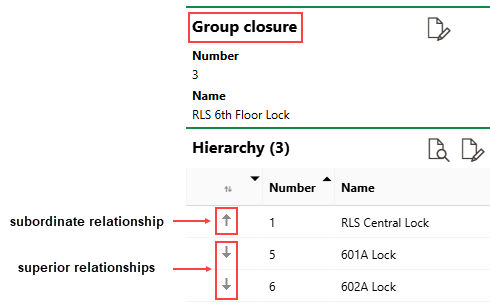
Subordinate and Superior Relationships in Hierarchy Section
To Establish Relationships Between Locks
1.Navigate to the details page for the central lock, group lock, or individual lock that you want to establish a hierarchical relationship to another lock for.
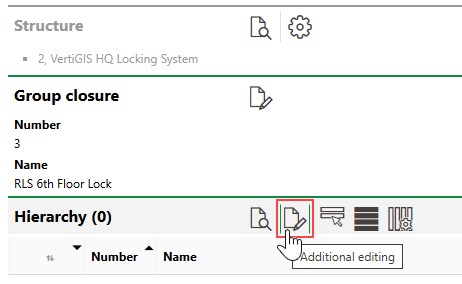
2.Expand the Hierarchy section and click the Additional Editing ( ) icon.
3.Expand the section for the type of lock with which you want to establish a hierarchical relationship. For example, if you began this procedure on the details page for a group lock and want to establish a subordinate relationship to a central lock, expand the Central Locks section.
4.Click the Add ( ) icon.
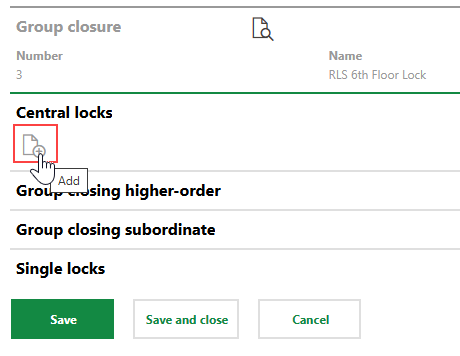
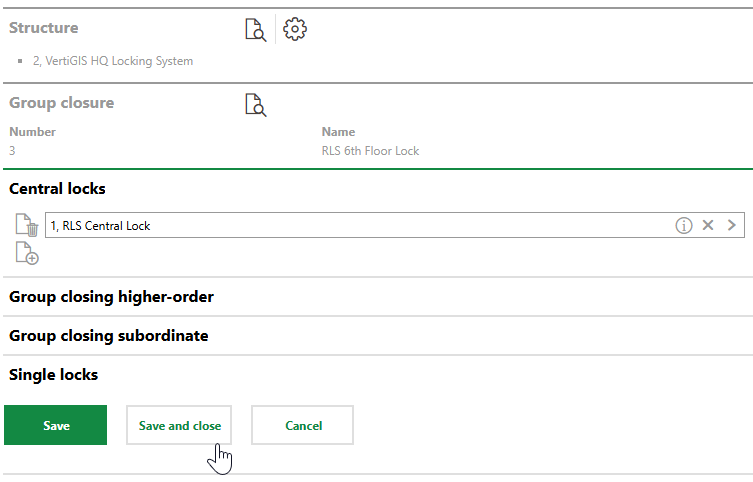
5.Select the lock with which you want to establish a relationship and click Apply, or double-click the lock. If you clicked the Add () icon under Central Locks, you can only select central locks in the VertiGIS FM database.
6.Click Save or Save and Close.
The central lock now appears in the Hierarchy section on the details page for the group lock, with a down-arrow to indicate that the group lock's relationship to the central lock is subordinate.
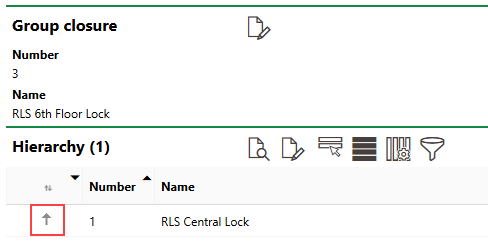
Central Lock in Group Lock's Hierarchy
Accordingly, the group lock appears in the Hierarchy section on the details page for the central lock, with an up-arrow to indicate that the central lock's relationship to the group lock is superior.
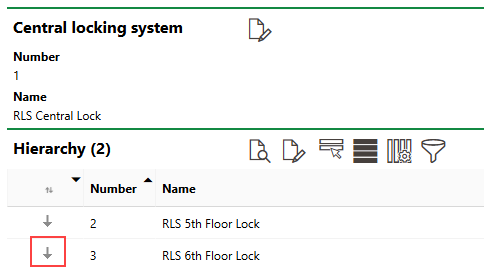
Group Lock in Central Lock's Hierarchy
To document all hierarchical relationships in your locking system, repeat this procedure until you have established the relationships between all locks in your locking system.
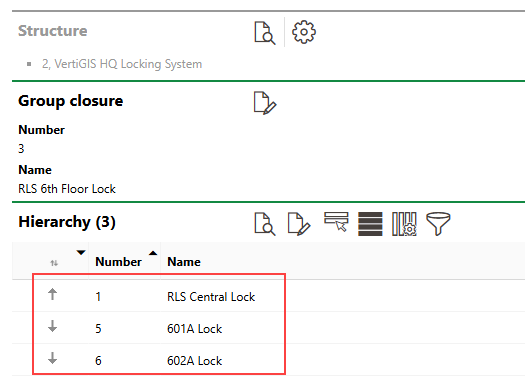
Group Lock with Subordinate (Central Lock) and Superior (Individual Lock) Relationships
You can also establish multiple hierarchical relationships in one action when you complete this procedure.
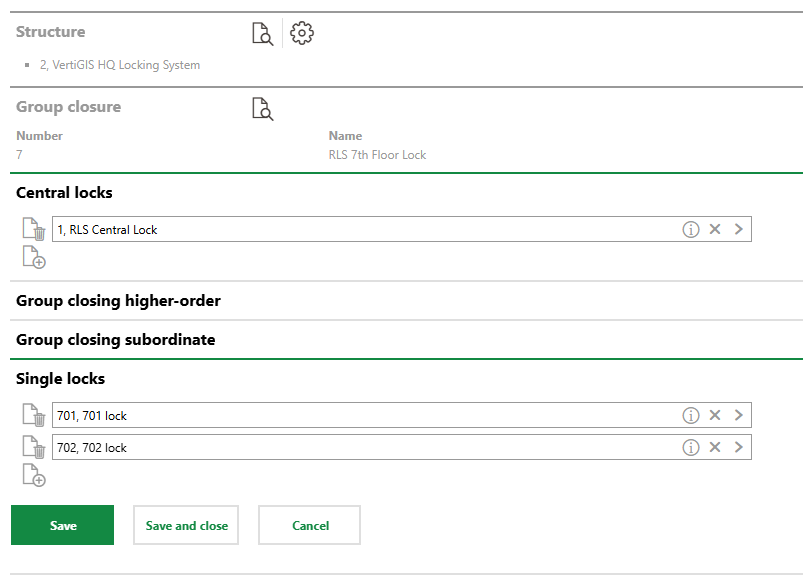
Central and Individual Locks Being Assigned to Group Lock's Hierarchy
Additional Group Level Locks
You can add additional levels to locking system hierarchies by establishing multiple levels of groups in the hierarchy.
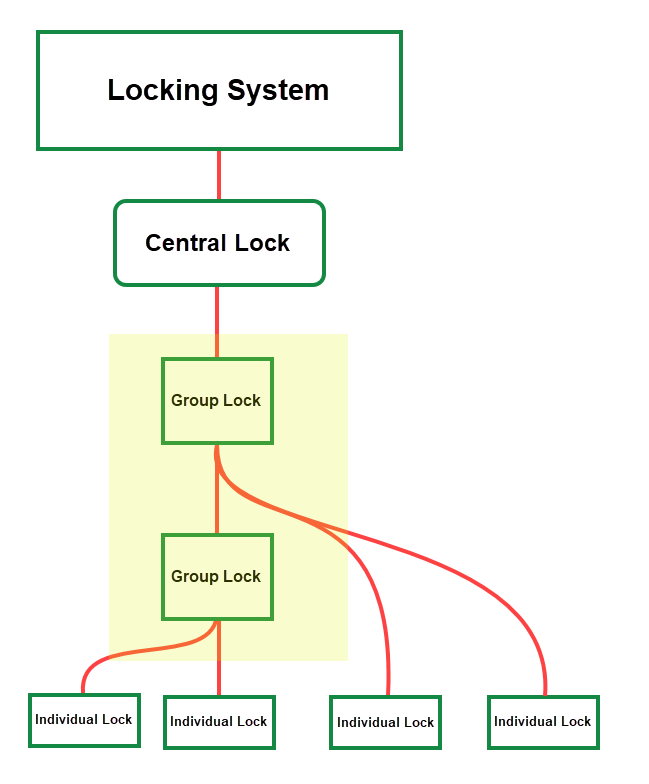
Locking System Hierarchy with Multiple Group Levels
To add multiple levels of groups to a locking system hierarchy, add a hierarchical relationship to a group lock ("Lock A"). Click the Add () icon in the Superior Group Lock section to select a group lock that will be superior to Lock A in the hierarchy. Click the Add () icon in the Subordinate Group Lock section to select a group lock that will be subordinate to Lock A in the hierarchy.
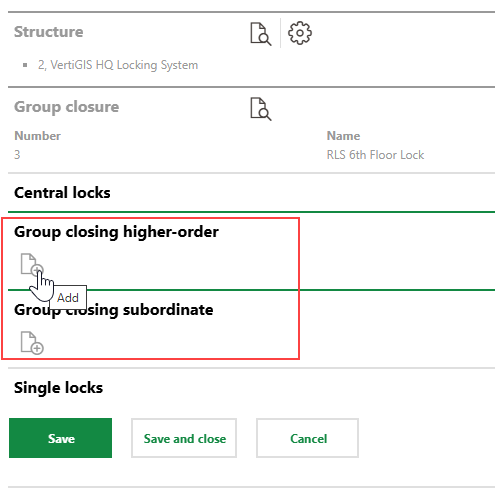
Adding Superior or Subordinate Group Locks to Hierarchy
Remove Hierarchical Relationship
To remove a lock's hierarchical relationship with another lock, click the Additional Editing () icon in its Hierarchy section and then click the Delete ( ) icon next to the lock whose relationship to the other lock you want to remove.
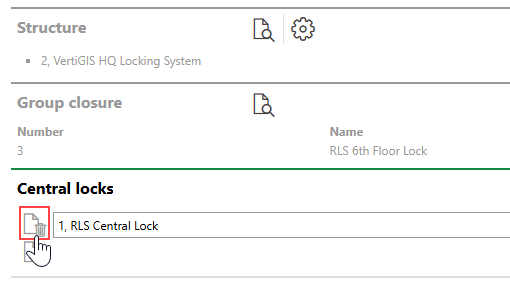
Removing a Lock's Hierarchical Relationship to Another Lock