In VertiGIS FM Greenspaces, you can designate a tree cluster as Cut to indicate that it has been removed from its green area.
You cannot replace cut tree clusters like you can with trees. Refer to Cut and Replace Trees for more information.
Tree Cluster Statuses
Status |
Description |
|---|---|
Active |
The tree cluster is alive and planted in a location in your VertiGIS FM environment. |
Inactive |
The tree cluster is still planted in a green area, but it does not require the same level of care and maintenance as an active tree cluster. |
Cut |
The tree cluster was previously planted in a location in your VertiGIS FM environment but has been removed. The tree cluster can no longer be edited in VertiGIS FM once it is in this state. |
You can change a tree cluster's status from Active to Cut by manually marking the tree cluster as cut or by completing a maintenance order whose order template has the Felling check box selected.
Cut a Tree Cluster
You can mark any active tree cluster in VertiGIS FM as cut by editing its core properties and entering the date the tree cluster was cut.
To Cut a Tree Cluster
1.Navigate to the details page of the tree cluster you want to cut.
2.Click the Edit ( ) icon.
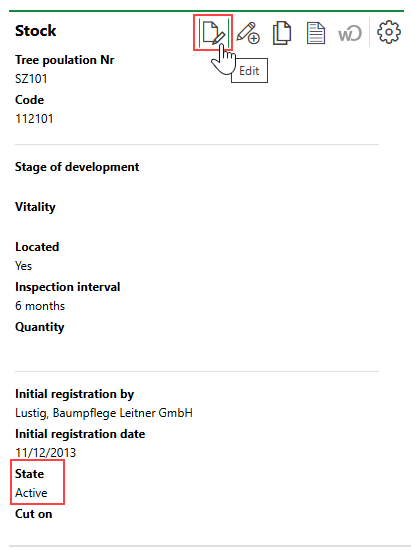
3.In the Basic Data section, select the date the tree cluster was cut in the Cut On field.
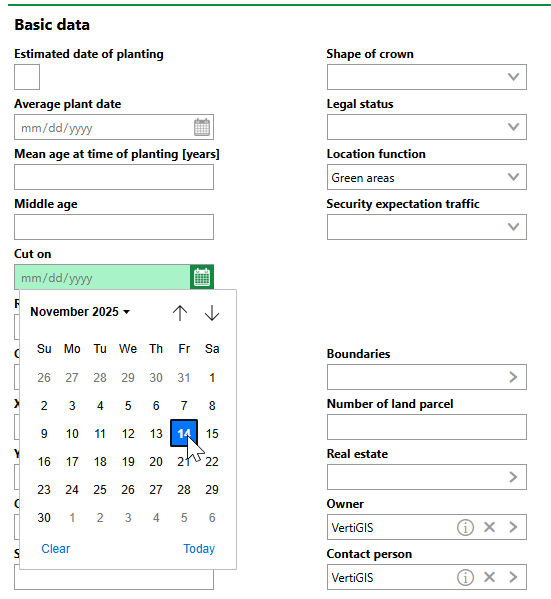
4.Click Save or Save and Close.
VertiGIS FM updates the tree cluster's status from Active to Cut.
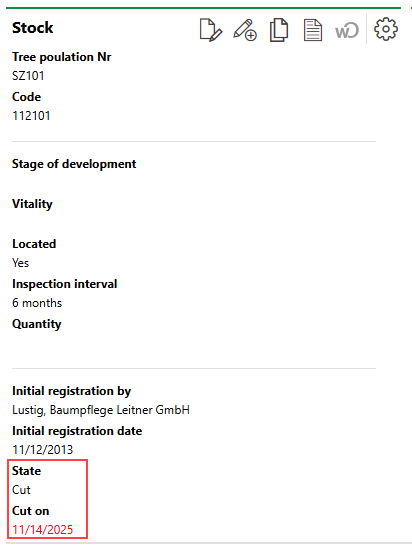
Cut Tree Cluster
Cut tree clusters appear in red text on the Tree Management search page.
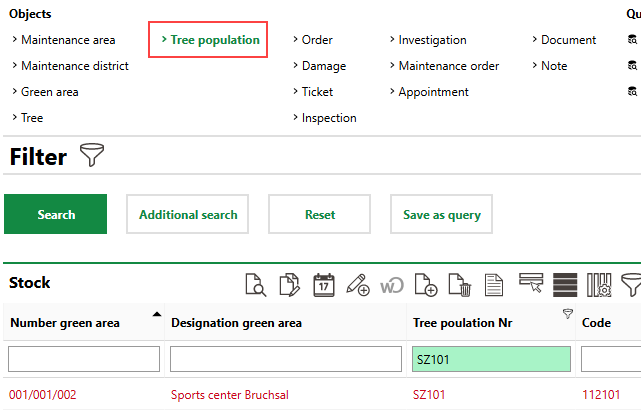
Cut Tree Cluster on VertiGIS FM Search Page