Each job's edits live in a branch version, isolated from the shared default version. Reconcile pulls the latest changes from the default version into your branch so you are working against current data. The reverse step, pushing your branch edits back to the default, is called post and happens when a job is closed.
A job's branch version is created automatically when the job is created, with the same version name in every feature service referenced in the map. You reconcile at two points in a job's lifecycle:
•During active work: A worker reconciles to bring the latest default-version changes into the branch and stay current.
•Before closing a job: A supervisor reconciles as the first step of closure.
Before You Begin
Reconcile checks for active locks on all related feature services first.
•If locks are found, reconcile does not run and a notification lists the affected services.
• All locks must be released before reconcile can proceed.
If you start reconcile with unsaved edits, a warning appears stating those edits will not be reconciled. You can cancel and keep editing, or proceed without them.
Release Lock from all Associated Versions
To release all locks for a job's associated versions in one action, click Release Locks on the job.
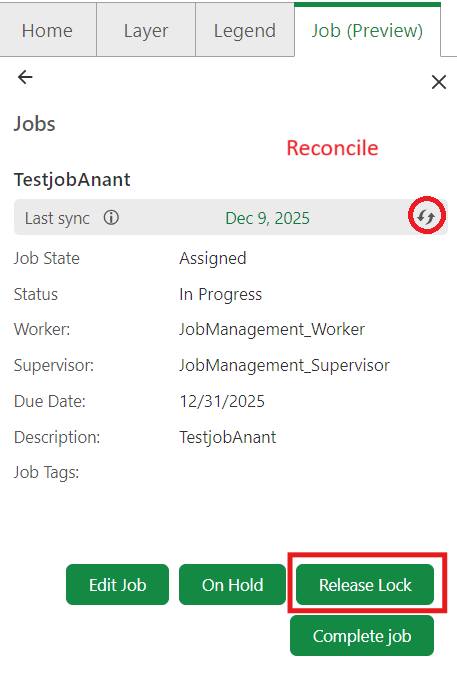
The system processes each version across all feature services in sequence.
If a lock cannot be released, an error message specifies the version and feature service that failed and advises you to retry or contact your administrator. The process continues through all remaining versions regardless of individual failures.
How Reconcile Works Across Feature Services
When reconcile runs, it processes all versions associated with the job - one per feature service.
The process runs across all services regardless of individual errors:
•Conflicts from all feature services are collected and displayed together in the conflict panel. Each conflict identifies the feature service it belongs to.
•If reconcile encounters an error in one feature service, it continues processing the remaining services. An error message identifies the affected feature service(s). You must retry reconcile for those services or contact your administrator.
•If conflict resolution fails for a specific feature service, an error is shown for that service. Resolution for other feature services is unaffected and does not need to be repeated.
For details on resolving conflicts, see Resolve Conflicts.
Synchronize Job Version with Default Version
The Last Sync field on the job shows the date on which the latest changes from the default version were last merged into the job's version.
To reconcile:
1.Select a job to view its details.
2.Click the refresh icon to reconcile.
The system compares all versions associated with the job against the default version of their respective feature services, bringing the latest changes into your job version while keeping your edits isolated.
If you click Reconcile while there are unsaved edits, a warning appears stating that these edits will not be reconciled. You can choose to cancel and continue editing, or proceed with the reconcile.
Next Steps