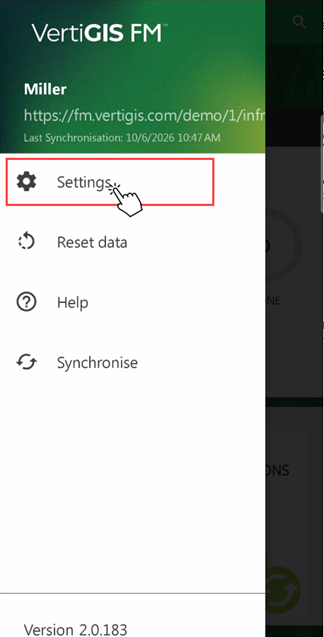
You can access the VertiGIS FM Energy app settings page by tapping the hamburger menu in the top-left corner and then tapping Settings.

Hamburger Menu
Tap Settings to see the app's available settings.
Settings Button |
App Settings Page |
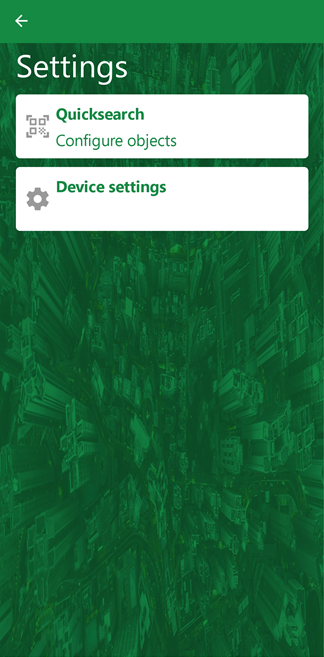
Quicksearch
The Quicksearch page determines the type of entities you see in search results when you scan a QR code on an asset in the field.
You can toggle a switch on or off for meters and metering points.
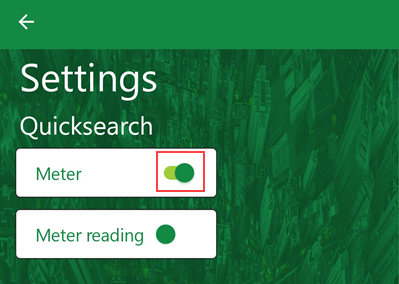
Quicksearch Settings Page
In the example above, only Meter is in the on position. If the user scans a QR code on a meter in the field, the search results will show all meters in the system. Search results will not include meter readings associated with the meter whose barcode you scanned.
Hardware Acceleration
Hardware acceleration moves some computing tasks onto hardware components like GPUs and ASICs in the device. When this setting is disabled, the software runs entirely on the device's CPU. Enabling this setting should allow the app to run more efficiently.
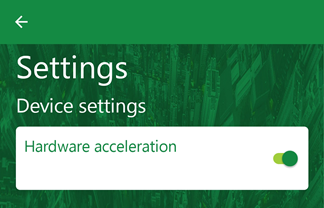
Hardware Acceleration Toggle
Language
The language in which text in the app appears mirrors the language setting selected in the web app. It cannot be changed in the VertiGIS FM Energy app. To change the language, change the language in the web version of VertiGIS FM and then synchronize or reset the app.