The ability to create and assign jobs depends on your organization's hierarchy:
•Organizations with multiple hierarchies (Hierarchy 2): Supervisors can create and assign jobs
•Organizations with single hierarchy (Hierarchy 1): Workers can create and assign jobs
Creating a New Job
To create a new job:
1.Navigate to the Job Management tab.
2.Select Jobs from the menu.
3.Click Create Job to open the job creation form.
4.Enter the Job Name and Description (description limited to 256 characters).
5.Add tags by typing the tag name and pressing Enter.
6.Select the Supervisor responsible for monitoring and approving the job.
7.Select the Worker(s) to assign the job to.
8.Set the Due Date for job completion.
9.Draw an area on the map to specify the job region:
oClick to start drawing the area boundary.
oContinue clicking to define the region.
oClick on the initial point to close the area.
oClick the delete button to clear and redraw if needed.
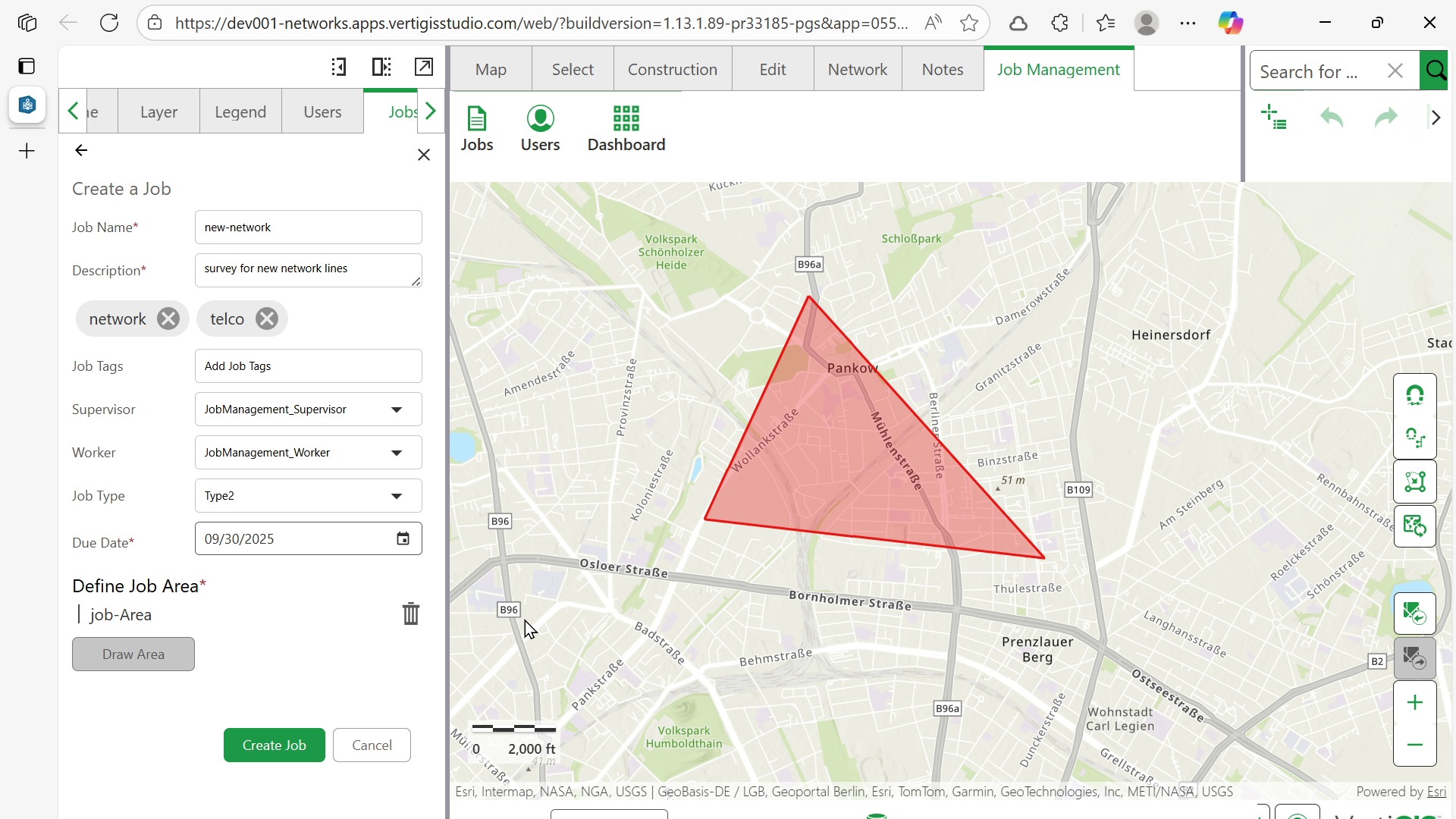
10.Click Create Job to finalize.
Next: