The current version of VertiGIS FM includes a suite of artificial intelligence (AI) features that automate repetitive, time-consuming tasks users previously completed manually.
As an administrator, you can implement the available AI features in your VertiGIS FM implementation by creating an AI profile that connects to an LLM and then selecting the users you want to apply the profile to. Currently, your AI profile can connect to managed AI services you have a subscription for or to your own LLM trained on company data. In the future, VertiGIS FM licences will include a subscription to an OpenAI model on the Azure platform.
Add an AI Profile
You can create an AI profile using your LLM or managed AI service subscription on the Artificial Intelligence administration page.
To Add an AI Profile
1.Navigate to the AI administration page (Administration > Interfaces > Artificial Intelligence).
2.In the AI Profiles section, click the Add ( ) icon.
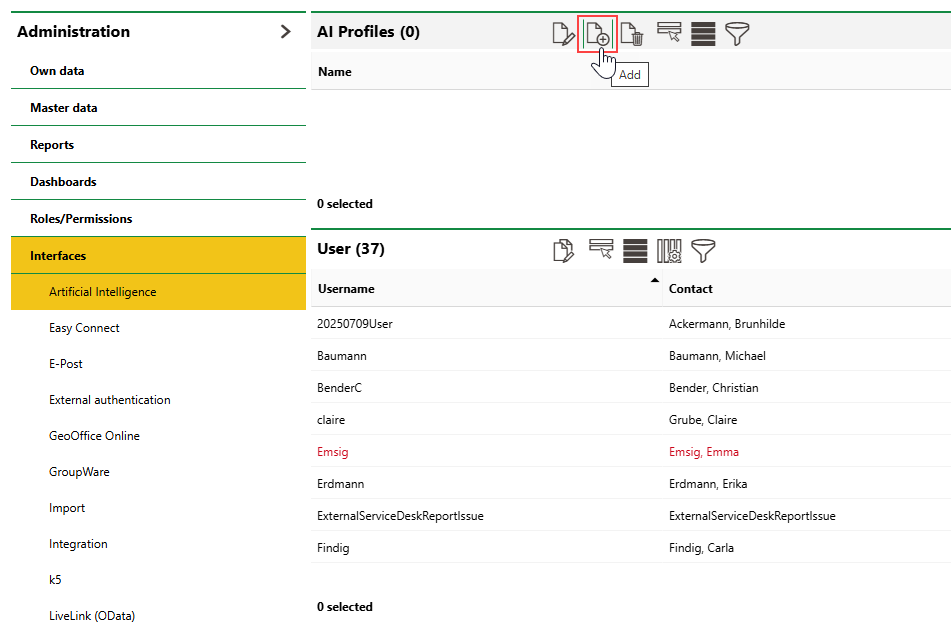
3.Enter the profile details in the appropriate field. Refer to AI Profile Details for descriptions of each field.
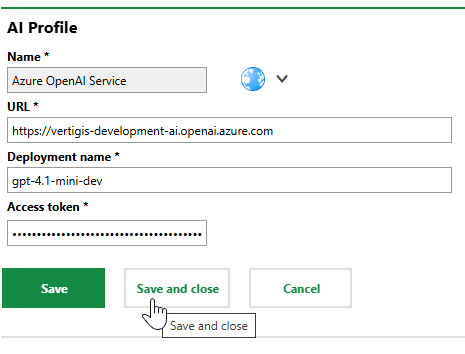
4.Click Save and Close.
Field |
Description |
|---|---|
Name |
A name for the LLM or managed AI service configuration. |
URL |
The endpoint or base URL of the LLM or AI service. |
Deployment name |
The model deployment of the LLM or AI service. VertiGIS FM queries the LLM's deployment model, not the LLM directly. |
Access token |
A token to access the LLM or AI service, provided by the managed service provider or by your organization. |
Assign AI Profile to Users
VertiGIS FM AI features are available to all users you assign the profile to. You can assign profiles to one user or multiple users at a time.
To Assign an AI Profile to a User
1.Navigate to the AI administration page (Administration > Interfaces > Artificial Intelligence).
2.In the Users section, select the users you want to assign the profile to and click the Batch Edit ( ) icon.
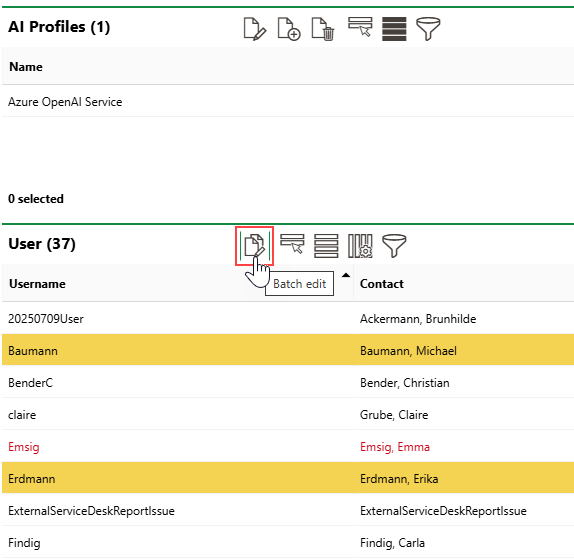
Press the ctrl key on a Windows keyboard to select multiple users by clicking.
3.Click the > button in the AI Profile menu under User.
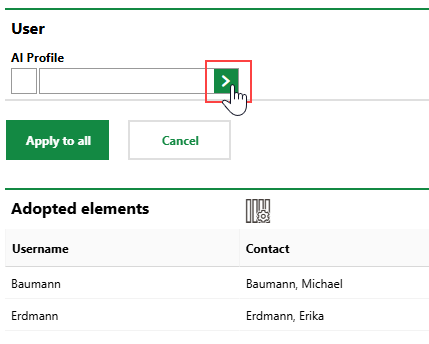
4.Select the AI profile you want to assign to the selected users and click Apply, or double-click the profile. You can select any profile listed in the AI Profiles section on the AI administration page.
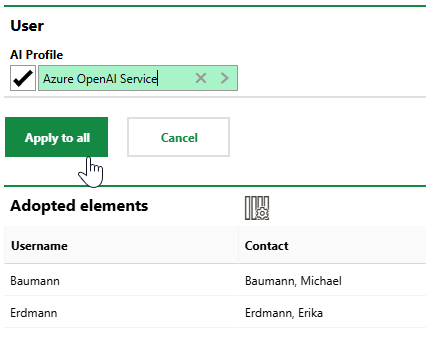
5.Click Apply to All.
The AI profile is now assigned to the user, meaning the user or their associated employee can now leverage VertiGIS FM's AI features using the LLM configured in the AI profile.
AI Tools
The AI tools outlined below are available in the current version of VertiGIS FM:
•Checklist Item Generator Tool
Only users assigned an active AI profile can access these features.