Idle periods are periods during which a vehicle cannot be reserved.
Idle periods are scheduled in conjunction with the Reservation Management module, which is typically bundled in licences for VertiGIS FM Buildings
Schedule an Idle Period
You can schedule an idle period for a vehicle on the vehicle's details page.
To Schedule an Idle Period
1.Navigate to the details page for the vehicle you want to schedule an idle period for.
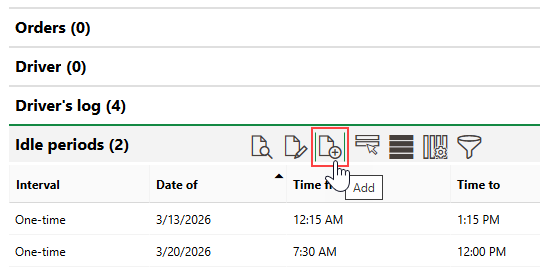
2.Expand the Idle Periods section and click the Add ( ) icon.
3.Enter the idle period's details in the corresponding information fields. At minimum, you must select the date the idle period will occur and its time parameters.
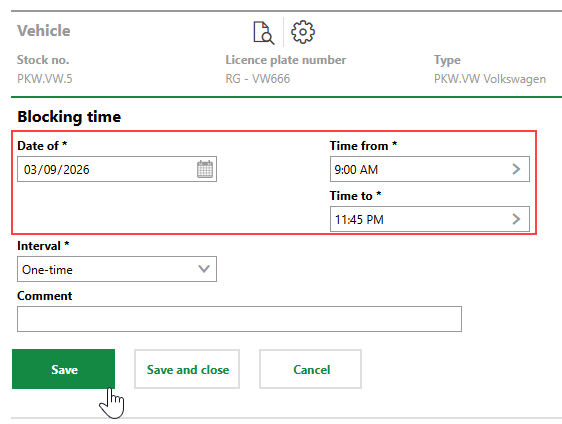
4.Click Save or Save and Close.
The scheduled period is now listed in the Idle Periods section.
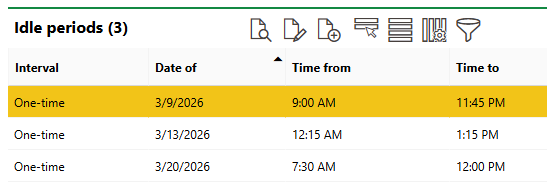
Idle Periods Section
Intervals
You can schedule an idle period to occur on a daily, weekly, monthly, or annual basis from the date selected in the Date of field by selecting the intended interval in the Interval menu.
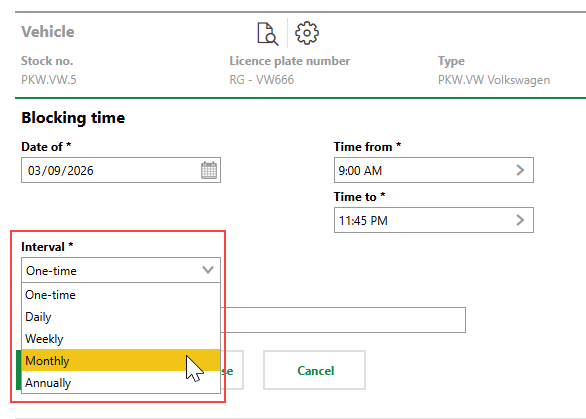
Interval Menu
Field |
Description |
|---|---|
Date of |
The date of the idle period. |
Time from |
The time of the day the idle period begins. |
Time to |
The time until which the idle period lasts. |
Interval |
How frequently the interval recurs after the Date of date. Refer to Intervals. |
Comment |
Additional information regarding the idle period. |