VertiGIS FM uses status ranges to calculate scores for assets in your system with assessment data entered by employees. Often, organizations use these scores to make high-level financial decisions regarding their assets.
You can enter status range scores during building inspections created in the Condition Assessment module or directly on the details page for buildings and building assets, devices, and other assets in your system.
Assets
For eligible assets, status range scoring is stored on the Status Ranges page, which you can access by clicking Status Ranges under Actions on the Condition Assessment legacy dashboard.
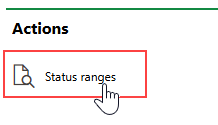
Status Ranges Link
This page lists the assets for which you can configure status range scoring. These include
•buildings, real estates, and rooms.
•devices in a specific subgroup or group in the Device and Systems Structure. You can configure whether you want to create status ranges by subgroup or group in the Condition Assessment product settings.
•other assets in the Inventory Management, Water, and Wastewater modules.
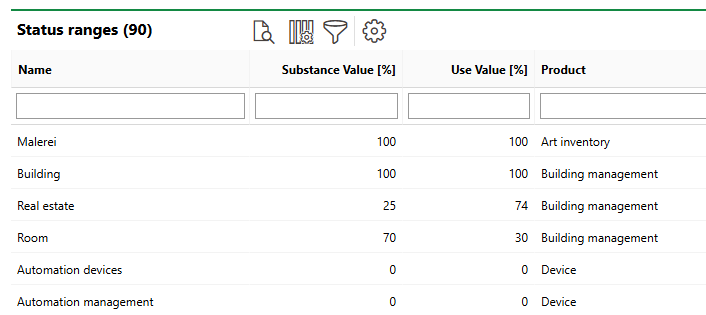
Status Ranges Assets
You can sort the assets in the table using the criteria below.
Status Range Columns
Column |
Description |
|---|---|
Name |
The name of the asset for which status range scoring is configured. |
Substance Value [%] |
The total number of points the asset is scored out of for its structural or material condition. You can enter any integer up to 100. |
Use Value [%] |
The total number of points the asset is scored out of for usage. You can enter any integer up to 100. |
Product |
The VertiGIS FM product or module associated with the asset. If the configuration is for assets in a group or subgroup in the Device and Systems Structure, this column indicates Device instead of Maintenance. Refer to Product Settings. |
You do not have to enter Substance Value [%] and Use Value [%] scores for the asset. VertiGIS FM will add the Substance Value [%] and Use Value [%] values you enter for entries within the asset and reflect the total in the Status Ranges table.
Substance Values and Use Values
An asset is assigned two separate scores according to its substance value (its structural or material condition) and its use value (how well the asset can be used in its current condition).
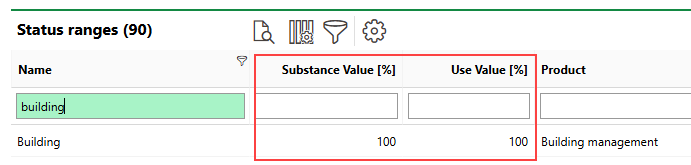
Substance and Use Values
For example, the status ranges for buildings could have an entry for the lighting system that is weighted at 10% for the building's Use Value [%] but only 4% for its Substance Value [%] (i.e., the lighting is more important to the building's usability than its material condition).
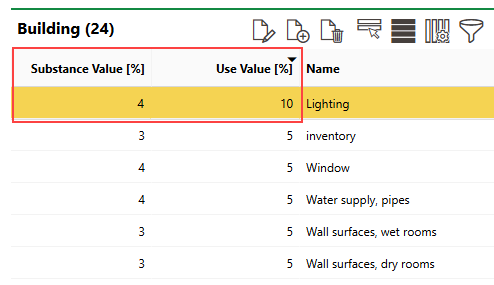
Status Ranges Page
If the building's lighting is in poor condition, its low score for this entry will affect the building's overall Use Value score more than its Substance Value score.
Add Assets
You cannot add assets to the list on the status ranges page. However, if you add a group or subgroup to the Device and Systems Structure in VertiGIS FM Maintenance, VertiGIS FM programmatically adds it to the list of assets on the status ranges page. If you add a group or subgroup to the system, you can record condition assessments for all individual devices in the group or subgroup.
Entries
Each asset in the status ranges table can be broken down into entries that represent an individual criterion on which the asset is scored. Typically, this refers to a component or part of the asset. Each entry can have different weighting in terms of how the entry's score affects the asset's overall Substance Value and Use Value scores.
Double-click an asset in the status ranges table to see its entries and its substance value and use value weighting.
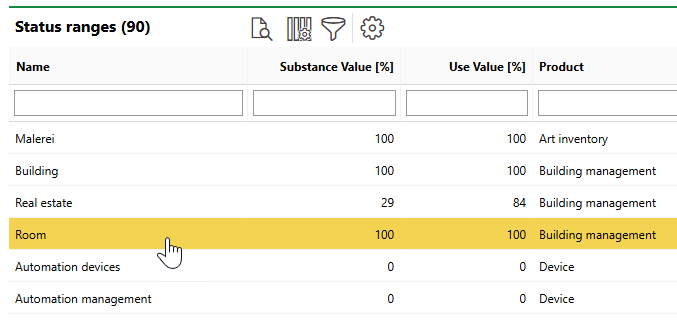
Status Ranges Table
In this example, the room asset has four entries on which it can be assessed. In this example, the Substance Value [%] and Use Value [%] values of the four entries both total 100.
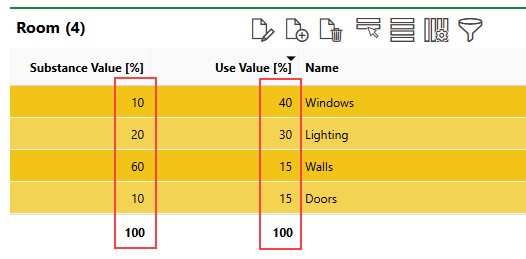
Substance Value and Use Value Totals for Asset
Each entry defined for an asset is scored once during an inspection. If a room receives a perfect score (i.e., no damage or defects) on its windows, it will receive 10% of its total possible Substance Value score and 40% of its total possible Use Value score.
Add an Entry
You can add a new entry that an asset can be scored on by clicking the Add ( ) icon on the asset's status range page.
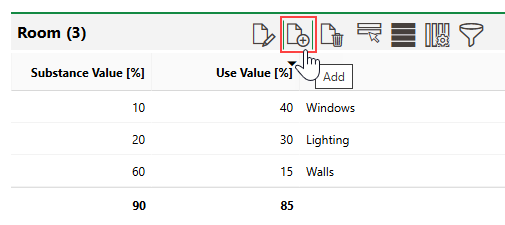
Adding a Status Range Entry
Enter a name for the entry in the Name field. Optionally, you can assign the entry to a category in the Group menu. Selectable options are saved in the Group catalog.
Refer to the Weighting Overview section to see the asset's other entries and the weighting values allocated to each one. You can subtract the totals from 100 to determine remaining points for the Substance Value [%] and Use Value [%] scores for the new entry.
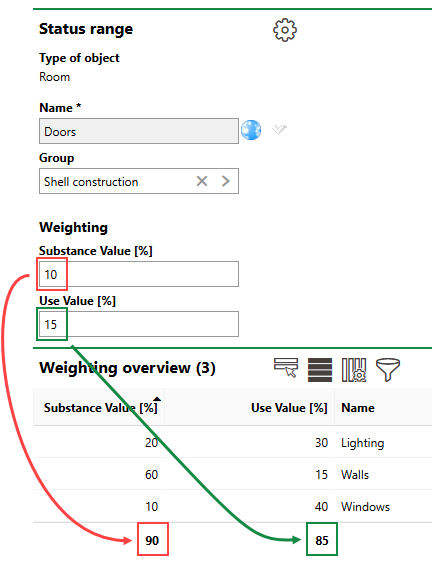
Remaining Percentages Shown in Weighting Overview Section
Click Save after adding the new entry. If you enter scores for the new entry that make the total of asset's Substance Value [%] or Use Value [%] scores exceed 100, VertiGIS FM will prevent you from saving and display an error message.
Define Status Worths for an Entry
To be functional for employees who assess the condition of your assets, each entry for an asset's status range must have a set of selectable options and corresponding scores for each entry.
After you save a new entry, you can add status worths by clicking the Add () icon in the Status Worths section.
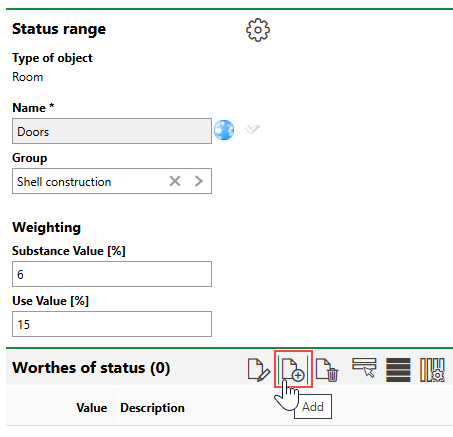
Status Worths
Each status worth you define for an asset entry represents a condition an employee can select to describe its status. Each status must have a corresponding integer between 1 and 6 selected in the Value menu, with 1 representing the best condition the asset entry can be in. You can only assign one status worth for each numerical value.
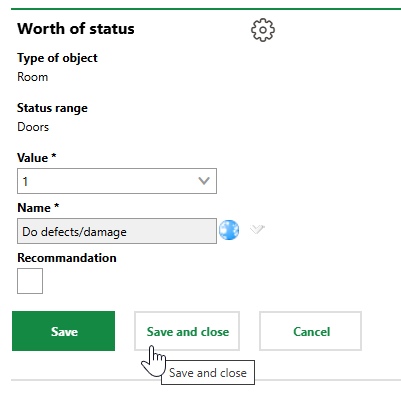
Adding a New Status Entry
Click Save and Close to add the status worth and its value to the asset entry. Repeat this process until the entry has a suitable list of options that employees can select to describe its condition.
Users will be unable to record condition assessments for entries that do not have at least one status worth created.
Enter Assessment Scores
Employees can enter condition assessments for assets in your database when you have configured the system according to the sections outlined above.
Refer to Record Status Range Assessments for more information.