The catalogs below are used to store selectable options for assets and features in the Fleet Management module. You can add options to these catalogs or edit existing ones by clicking Administration > Master Data > Catalog Management > Vehicle Fleet Management.
Fleet Catalogs
Catalog |
Description |
|---|---|
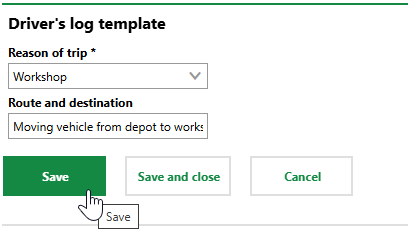
In this catalog, you can create entries that users can select when they add an entry to a vehicle's driver's log. Each entry requires a selection from the Reason of Trip catalog and a manually entered Route and Destination description.
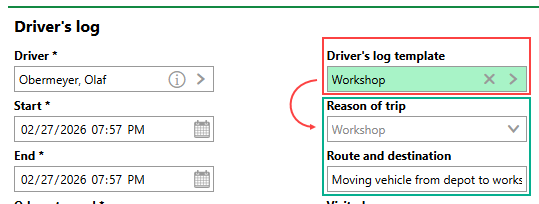
Example Driver's Log Template When you select an entry in the Driver's Log Template menu when you add a driver's log, VertiGIS FM populates the log's Reason of Trip and Route and Destination fields with the values saved in the catalog.
Catalog Entry Selected in Driver's Log |
|
This catalog stores entries that can be selected from the Fuel Type menu when you add an entry to a vehicle's driver's log. |
|
This catalog stores engine types. Entries in this catalog can be selected from the Kind of Engine menu in a vehicle's Technical Characteristics properties. |
|
This catalog stores vehicle manufacturers. Entries in this catalog can be selected from the Manufacturer menu in a vehicle's Technical Characteristics properties. |
|
This catalog stores entries that users can select from the Reason of Trip menu when you add an entry to a vehicle's driver's log. You can also select these entries in driver's log templates you create in the Driver's Log Template catalog. |
|
This catalog stores entries that users can select from the Structure menu in a vehicle's details. |
|
Entries in this catalog can be selected from the Vehicle Type menu in a vehicle's Technical Characteristics properties. |