The catalogs below are used to store selectable options for assets and features throughout VertiGIS FM. You can add options to these catalogs or edit existing ones by clicking Administration > Master Data > Catalog Management > Platform.
Platform Catalog Sections
Catalog |
Description |
|---|---|
This section stores additional catalogues that are applied to checklists as conditions. Each entry stores its own entries that users can select from a drop-down menu when they complete checklist items that have a condition configured with the additional catalogue entry selected. |
|
This section stores options that describe how a subcontract is awarded to a contract. Users can select one of these options from the Award Procedure menu when they add or complete a subcontract. |
|
This section stores the options that users can select as a Document Type when they upload a new document into VertiGIS FM. |
|
This section stores the options that users can select from ownership drop-down menus to indicate the commercial status of an asset or object (for example, Leased, Property, Rented, Third-party property). The Leased entry in this section is hard-coded and cannot be deleted. This option is associated with additional functionality in some VertiGIS FM modules. For example, if you select Leased from the Ownership menu in a vehicle's details, the form loads an additional Leasing section in which you can specify the details of the vehicle's lease. |
|
This catalog stores entries that describe the phase of a project. Entries in this catalog are selected from the Phase menu when users related to a construction project. This catalog is primarily intended for German customers to comply with the HOAI regulation in Germany. |
|
This section stores the priority levels that can be assigned to (e.g., High, Medium, Low). |
|
This section stores quick responses that users can select when they post an answer to a . |
|
This section stores options that users can select from the Release menu when they upload a new floor related to a construction project. |
|
This menu stores the options that represent the scale of a floor plan drawing relevant to the representation's actual size. Users can select these options in the Scale menu when they related to a construction project. |
|
This section stores professions and skills that are associated with VertiGIS FM data objects (for example, ) in the Trade menu. Examples of entries could include electricians, plumbers, and janitors. |
|
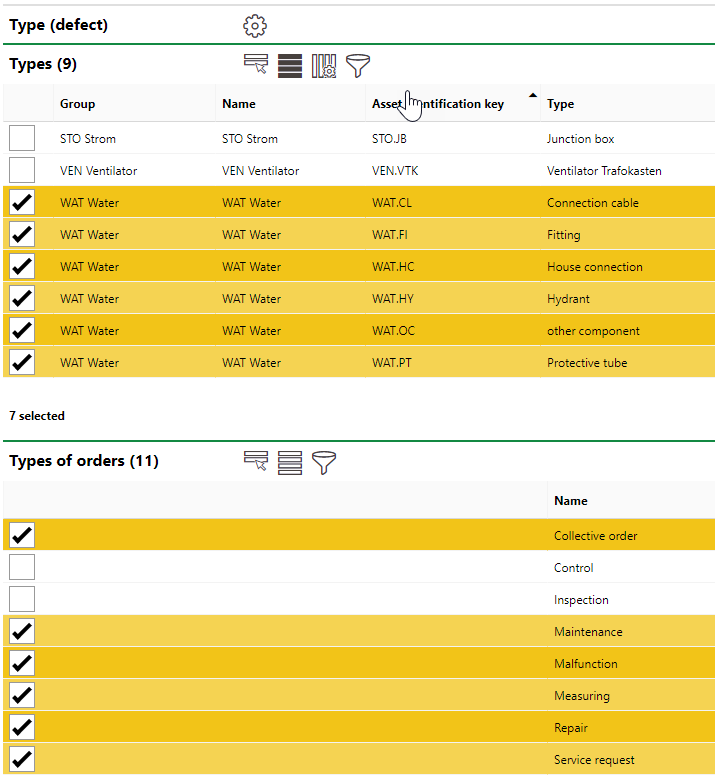
This section stores the categories into which are grouped. You must select one when you add a new defect. Each entry in this section has its own Types and Types of Orders section. The selected in the Types section indicate the whose defects can have this Type selected when you add a defect to a device. The selected entries in the Types of Orders section indicate the which this type of defect can be selected when you add a defect to an .
Entry Page for a Type of Defect |
|
This section stores the categories into which are grouped. Users must select one when they add a new defect indication. |
|
This section stores options that can be selected from the Type of Order menu when users create or complete a subcontract. |