API documentation: https://resources.geocom.ch/VertiGIS/VertiGIS_Attribute_Form/1.5.0/types/common_SchemaInterfaces.TranslatorLocales.html
What Are Translations?
The locales section enables multi-language support, allowing your Attribute Form to display text in different languages based on the user's preference. This is essential for international teams or organizations operating in multilingual regions.
Example: A European utility company operates in Switzerland where German, French, and Italian are official languages. The same app can show "Durchmesser" to German users, "Diamètre" to French users, and "Diameter" as the default.
Language Structure
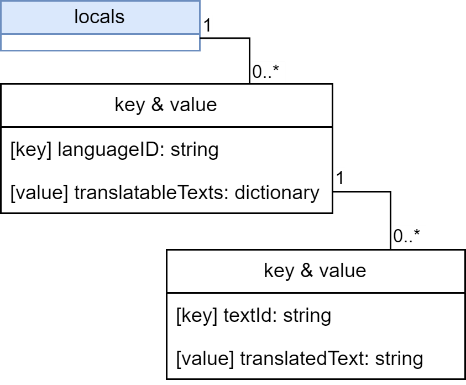
Translations are organized by language code:
•inv (invariant): The default/fallback language, typically English
•de: German
•fr: French
•es: Spanish
•it: Italian
•And so on, using ISO 639-1 two-letter codes
If a user's language isn't configured, the system automatically falls back to the inv version.
JSON Structure
Examples
Scenario: You want field labels and messages to appear in English and German.
{
"locales": {
"inv": {
"fieldDiameter": "Pipe Diameter",
"fieldMaterial": "Material Type",
"messageRequired": "This field is required"
},
"de": {
"fieldDiameter": "Rohrdurchmesser",
"fieldMaterial": "Materialtyp",
"messageRequired": "Dieses Feld ist erforderlich"
}
}
}
Using the translations: Reference them with the @ prefix in your configuration:
{
"fields": [
{
"name": "diameter",
"title": "@fieldDiameter"
}
]
}
When a German user opens the form, they see "Rohrdurchmesser". English users see "Pipe Diameter".
Advanced Example: Embedding Expressions in Translations
You can make translations dynamic by embedding expressions directly within the translated text.
Scenario: You want to display the Object ID within a translated title.
Step 1: Define an expression to get the Object ID:
"expressions": {
"getObjectID": "Concatenate('(OID: ', $feature.objectid, ')')"
}
Step 2: Include the expression in your translations using {@expressionName} syntax:
{
"locales": {
"inv": {
"titleWithObjectID": "Water Valve {@getObjectID}"
},
"de": {
"titleWithObjectID": "Wasserventil {@getObjectID}"
}
}
}
Result:
•English users see: "Water Valve (OID: 1234)"
•German users see: "Wasserventil (OID: 1234)"
API documentation: https://resources.geocom.ch/VertiGIS/VertiGIS_Attribute_Form/1.5.0/interfaces/common_SchemaInterfaces.CodedValues.html