A coded value is a pair consisting of:
•Code: The numeric or text ID stored in the database (e.g., 10, PVC)
•Value/Name: The human-readable label shown to users (e.g., "Polyvinyl Chloride")
Why use codes instead of storing the full text?
1.Saves space: Store 10 instead of "Polyvinyl Chloride Pipe Material"
2.Easier updates: Change the display name without touching the data
3.Consistency: Prevents typos like "Steel", "steel", "STEEL" being treated as different values
4.Multi-language support: The same code (10) can show different text in different languages
Think of them like airport codes - LAX is stored in databases, but displayed as "Los Angeles International Airport" to travelers.
What are Domains
A domain is simply a collection of coded values that define all valid options for a field. Think of it as a dropdown menu definition.
Example: A "Pipe Material" domain might contain
•Code: 10 → Name: "PVC"
•Code: 20 → Name: "Steel"
•Code: 30 → Name: "Copper"
•Code: 40 → Name: "Concrete"
Configuration Properties
Each domain can be customized with these properties:
•codedValues: The list of code-name pairs (mandatory)
•sortDirection: Controls list ordering
oascending: Smallest value first (0-9, A-Z)
odescending: Largest value first (Z-A, 9-0)
•sortMode: Determines what to sort by
oalphabetical: Sort by the display name ("Copper" before "Steel")
oby_code: Sort by the numeric/text code (10 before 20)
oby_definition: Keep the exact order from your JSON configuration
Additional Properties for Each Coded Value
Beyond the basic code and name, each entry supports:
•enabled: Shows or hides this option based on a condition
oUse true/false for static visibility
oUse an Arcade expression for dynamic visibility (e.g., "$feature.assetType == 10")
oExample: Only show "High Pressure" material options when pipe type is "Transmission"
•isRetired 🕑: Marks outdated values that can't be selected for new features but might exist in old data
oSet to true to show the option with a clock icon
oExample: "Asbestos" pipes were used historically but aren't allowed for new installations
oUsers can still see existing asbestos pipes but can't create new ones
•dependentCodedValues: Creates cascading dropdowns where one selection filters another list
oExample:
1.User selects "Wood" from Material Group
2.Material Type dropdown automatically updates to show only wood types: Oak, Pine, Maple
3.If user changes group to "Metal", Material Type updates to: Steel, Aluminum, Copper
oProperty format: {"fieldName": "@domainName"}
JSON Structure
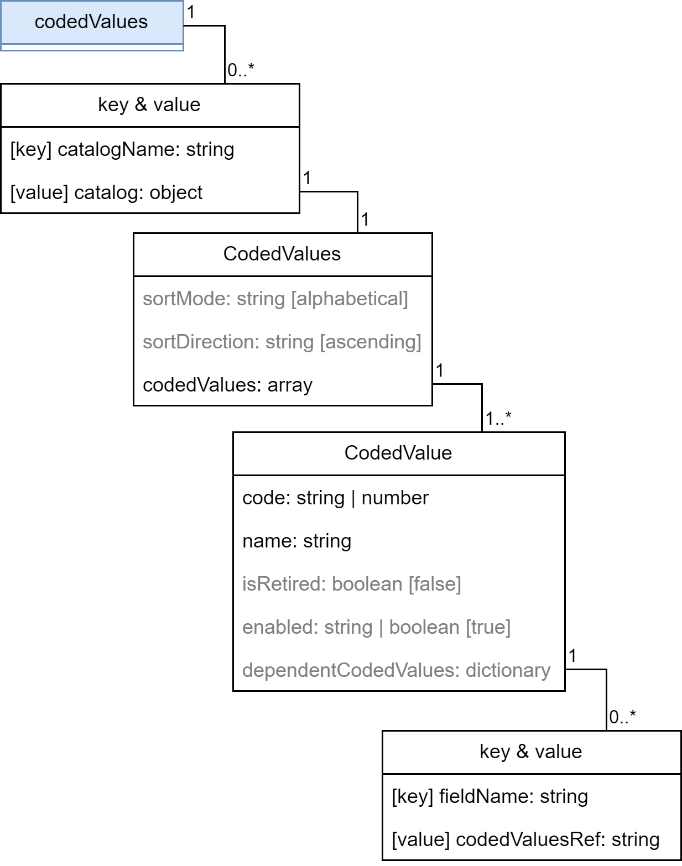
Example: Construction Materials with Dependent Dropdowns
You're managing a construction asset database. Users first select a general material group (Wood, Metal), then see specific materials based on that choice. Metal options are only available for certain asset types.
{
"codedValues": {
"cv_materialgroup": {
"sortDirection": "ascending",
"sortMode": "alphabetical",
"codedValues": [
{
"code": 10,
"name": "@materialGroup_woods",
"isRetired": false,
"enabled": true,
"dependentCodedValues": {
"material_field": "@cv_wood_materials"
}
},
{
"code": 20,
"name": "@CV_MaterialGroup_Metals",
"isRetired": false,
"enabled": "$feature.assetType == 10",
"dependentCodedValues": {
"material_field": "@cv_metal_materials"
}
}
]
},
"cv_wood_materials": {
"sortDirection": "ascending",
"sortMode": "alphabetical",
"codedValues": [
{
"code": 300,
"name": "Beech"
},
{
"code": 500,
"name": "Oak"
}
]
},
"cv_metal_materials": {
"sortDirection": "ascending",
"sortMode": "alphabetical",
"codedValues": [
{
"code": 1000,
"name": "Copper"
},
{
"code": 1010,
"name": "Iron"
}
]
}
}
}
How this works:
1.Material Group dropdown shows two options:
o"Woods" (code 10) - always available
o"Metals" (code 20) - only appears when assetType field equals 10
2.When user selects "Woods":
oThe material_field dropdown automatically switches to use cv_wood_materials domain
oUser sees: Beech, Oak
3.When user selects "Metals":
oThe material_field dropdown switches to cv_metal_materials domain
oUser sees: Copper, Iron
4.Translations: Notice @materialGroup_woods and @CV_MaterialGroup_Metals – these reference the translations defined in the locales section, so users see localized names
Pro tip: You can chain multiple dependent fields. For example: Country → State/Province → City