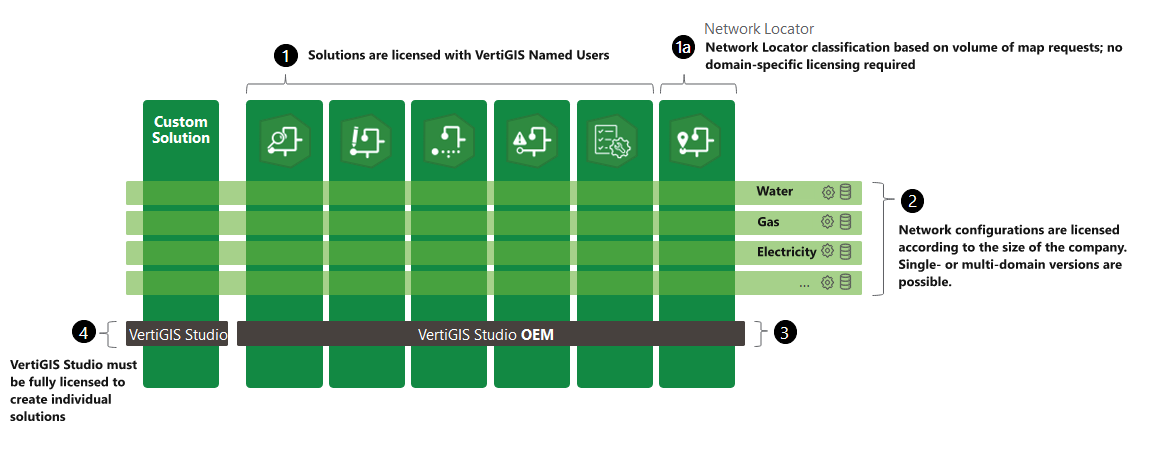
VertiGIS Solutions licensing is based on a combination of three license components:
•An Esri Named User license (person-specific)
•An OEM version of VertiGIS Studio
•A VertiGIS Networks Named User license
Esri Licensing
VertiGIS Networks integrates with Esri technology and consumes content from various Esri products.
•All required Esri licenses for authoring and publishing (for example ArcGIS Pro, ArcGIS Enterprise, ArcGIS Online) must be obtained from your Esri distributor.
•VertiGIS Networks follows the modern ArcGIS Identity model for authoring and accessing applications.
•At minimum, you need:
oOne Creator user type with Advanced Editing rights to create and maintain network content.
oOne Publisher user type to publish solution packages, feature services, and web maps.
An Esri portal (ArcGIS Online or ArcGIS Enterprise) and the ArcGIS Identities used within it are also provided through your Esri distributor.
VertiGIS Studio Web Licensing
A VertiGIS Studio license is a prerequisite for licensing VertiGIS Networks.
Typically, the Studio License Bundle is included automatically when you purchase VertiGIS Networks.
For more details:
•For information about the Studio Web licensing mechanism, see the VertiGIS Studio licensing documentation.
•To activate your Studio license for the first time, refer to the VertiGIS Studio license activation guide.
VertiGIS Networks Licensing
After your VertiGIS Networks subscription is processed:
•Your organization is registered as a Networks customer.
•The required VertiGIS Studio (OEM) and VertiGIS Networks Named User licenses are assigned automatically.
•The system continuously validates your license to ensure compliance.
For expired or invalid license, users receive a notifation: "Your Networks license is invalid. Please contact your administrator to renew your license."
This information applies only to VertiGIS licensing.
Network and Security Requirements
All Portal and license communication, whether for a configurator in the Designer or an end user in a deployed solution, uses standard HTTPS requests. The following should be considered when planning the network environment:
•VertiGIS software does not support custom SSL certificate exceptions.
•VertiGIS software does not support explicit application-level proxy configuration; proxying must be handled at the operating system or .NET level.
•If the network environment includes proxies, self-signed certificates, or other intercepting infrastructure between users and the configured Portal, the customer is responsible for ensuring that this infrastructure permits the standard requests described above.
Running a Networks Solution - Editor, Explorer, Simulator
When an end user opens a deployed Networks solution, the Editor, Explorer, or Simulator application, the following license validation steps occur:
1.The application resolves its Portal configuration from the local server, using the standard on-premises Studio Web configuration endpoint.
2.The application requests information from the Portal and, if the solution is secured, prompts the user to sign in.
3.The application retrieves the solution's configuration and data from the Portal, which includes the Account ID of the solution's author or publisher.
4.The application validates the license associated with that Account ID, confirming that a valid, unexpired base Studio Web SKU (GCXWBV family) is present. This step uses the same license validation mechanism as any on-premises Studio Web application; refer to the Studio Web Licensing chapter for details.
5.Networks-specific: once the base license check succeeds, a separate validation confirms the presence of the SN-VNE-BASE SKU.
6.Networks-specific: the application also validates the user against the required named-user license described above.
If the SN-VNE-BASE SKU is not present, the Editor, Explorer, or Simulator application currently displays a dismissible warning, which reappears periodically if dismissed. Deployments missing this SKU should be corrected proactively rather than relying on the dismissible warning.
Summary
Every Networks license validation ultimately confirms three conditions: that the resolved Account holds a valid base Studio Web license, that it also holds the Networks SN-VNE-BASE SKU, and that the signed-in user holds a valid named-user entitlement. Portal resolution, sign-in, and base license validation are inherited unchanged from Studio Web (see the Studio Web Licensing chapter); only the final two checks are specific to Networks.
Contact
For questions about licensing, whether for Esri products or VertiGIS Networks, please contact your sales representative.