You can specify which rooms in your facilities a given door grants access to.
If the room is also associated with a cylinder and lock, keys assigned to the lock grant will grant access to the room according to the application's logic.
Locks and keys are managed in the Key Management module typically included with VertiGIS FM Buildings.
To Establish Room Access for a Door
1.Navigate to the details page for the door or gate whose room access you want to document in VertiGIS FM.
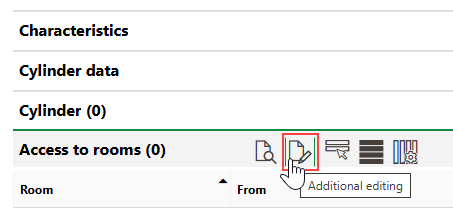
2.Expand the Access to Rooms section and click the Additional Editing ( ) icon.
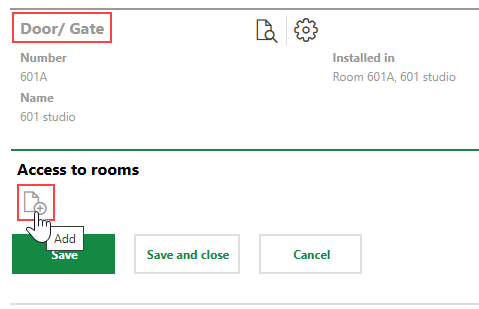
3.Click the Add ( ) icon.
To select a room in the Selection: Room dialog, you must navigate through its building hierarchy (i.e., the real estate, building, and floor that contain the room you want to select). If you click the wrong asset in the building hierarchy and need to go back, you can click the up arrow icon to move back up a level in the building hierarchy.
4.Select a room the door grants access to and click Apply, or double-click the room.
Optionally, specify the date the door was installed in the room in the From menu and the date it will be removed in the Until menu.
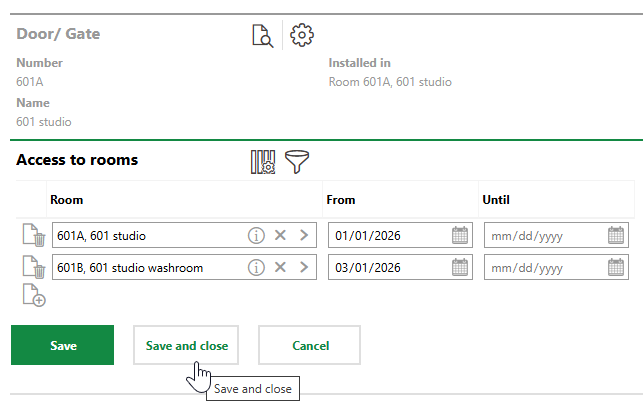
5.Click Save and Close.