Introduction
This chart bootstraps a DXF Export Service deployment on a Kubernetes cluster using the Helm package manager.
The chart includes a bundled PostgreSQL database (deployed as a StatefulSet) that is used by default. You can skip it by providing your own external database connection string via dbConnection.
What is DXF Export Service?
The DXF export service exports your visible map to DXF or Binary DXF format at a 1:1 scale when possible.
DXF (Drawing Exchange Format) is a file format that Autodesk developed for exchanging CAD (Computer-Aided Design) data between different programs. Because DXF is an open format, it's ideal for sharing data between different CAD systems.
When you export to DXF, the map and all selected layers are exported and available for download.
Prerequisites
•Kubernetes 1.28+
•Persistent Volume provisioner support in the underlying infrastructure
•Helm >= 3.8.0
•kubectl configured to communicate with your Kubernetes cluster.
Install the Chart
Authenticate to the Container Registry
helm registry login vertigisapps.azurecr.io \
--username <acr-username> \
--password <acr-password>
Install the Helm Chart
helm install dxf-export \
oci://vertigisapps.azurecr.io/charts/dxf-export \
--version <chart-version>
To install the chart in a separate namespace:
helm install dxf-export \
oci://vertigisapps.azurecr.io/charts/dxf-export \
--namespace dxf-export --create-namespace \
--version <chart-version>
The command deploys the DXF Export service on the Kubernetes cluster with the default configuration. The configuration section lists the parameters that can be configured during installation.
List all releases using helm list
To inspect the chart before installing it:
# if not yet authenticated using helm registry login
# --username <username> --password <password>
helm pull oci://vertigisapps.azurecr.io/charts/dxf-export --untar
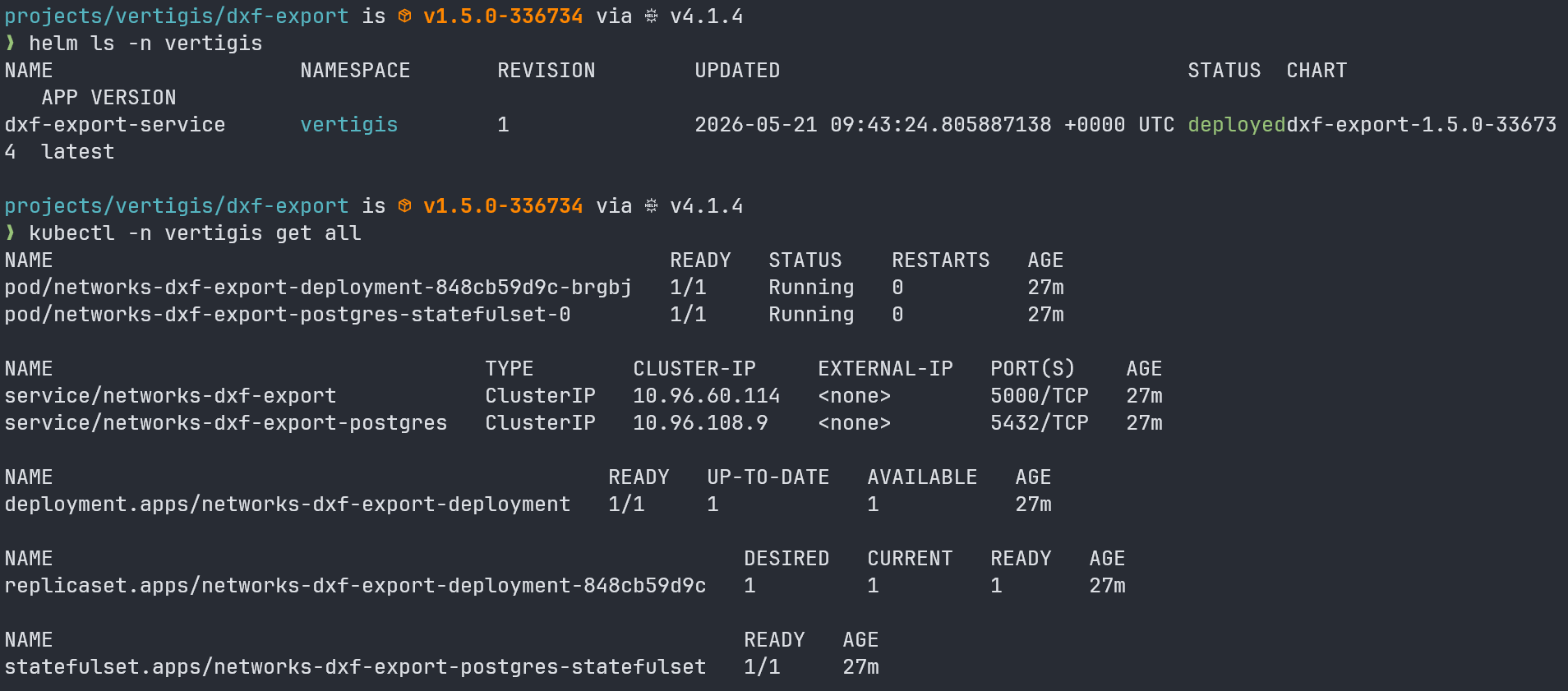
To check the deployment and the objects created by the helm chart, use:
kubectl -n <namespace> get all
Uninstall the Chart
# if installed in a different namespace, add the --namespace=<namespace> flag
helm uninstall dxf-export
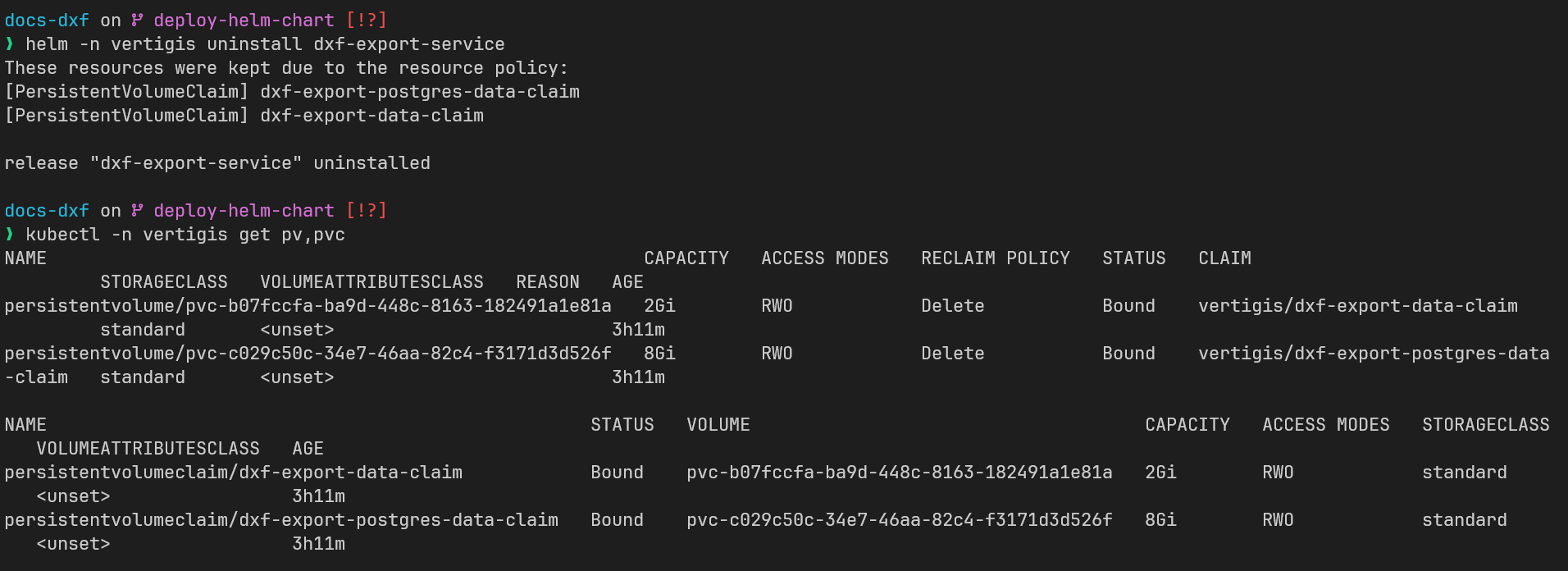
The command removes all the Kubernetes components associated with the chart and deletes the release.
Persistent Volume Claims are retained after uninstall - helm.sh/resource-policy: keep. Delete them manually if you no longer need the data.
kubectl delete pvc dxf-export-data-claim
kubectl delete pvc dxf-export-postgres-data-claim
If the persistent volume claim gets stuck in Terminating state, see Storage Object in Use Protection
Upgrade Deployment
Before upgrading, go through the changelog to know about any breaking changes.
helm upgrade dxf-export \
oci://vertigisapps.azurecr.io/charts/dxf-export \
--version <chart-version>
Configuration
You can customize the deployment configuration by providing your own values.yaml file during installation.
To install the chart with the custom values file:
helm install dxf-export \
oci://vertigisapps.azurecr.io/charts/dxf-export \
--namespace dxf-export --create-namespace \
--version <chart-version> \
-f values.yaml
Registry and Image
The chart pulls images from a private container registry. Provide the registry URL and credentials. A kubernetes.io/dockerconfigjson pull secret named dxf-export-registry-secret is created automatically from these values.
If you already have a pull secret in the cluster, set registry.secretName to its name and the chart will use it instead of creating one.
Ingress
Ingress is disabled by default. To expose the service externally, set ingress.enabled=true and configure the global hostname and TLS values.
The ingress routes requests at path /dxf-export(/|$)(.*) to the service.
ingress:
enabled: true
annotations:
nginx.ingress.kubernetes.io/rewrite -target: /$2
global:
hostname: dxf-export.example.com
ingressClassName: nginx
tlsSecretName: dxf-export-tls
To create a TLS secret, use cert-manager or run the following command:
openssl req -x509 -newkey rsa:2048 -sha256 -days 365 -nodes \
-keyout server.key \
-out server.crt \
-subj "/CN=example.com"
And then create the secret with:
kubectl -n <namespace> create secret tls dxf-export-tls --cert server.crt --key server.key
Database
By default the chart deploys a bundled PostgreSQL instance as a StatefulSet alongside the application. This is suitable for simple deployments.
To use an external database, set dbConnection to a full ADO.NET-style connection string. When dbConnection is set, the bundled PostgreSQL StatefulSet, its Service, and its PVC are all skipped.
# External PostgreSQL
dbConnection: "Host=my-db-host;Port=5432;Username=myuser;Password=mypassword;Database=ExportService"
dbProvider: "Postgres"
dbProvider defaults to Postgres and only needs to be set when using a different database engine.
Persistent Storage
The application stores generated DXF export files in a PVC (dxf-export-data-claim) mounted at /app/DXFExports.
When replicaCount is greater than 1, the chart automatically uses ReadWriteMany access mode and the azurefile-csi storage class so that all replicas can share the volume. You can override this behavior explicitly via the pvc values.
Pod Scheduling
Node selector, tolerations, and affinity for all pods (application and database) are configured under global:
global:
nodeSelector:
kubernetes.io/os: linux
tolerations:
- key: "dedicated"
operator: "Equal"
value: "app"
effect: "NoSchedule"
affinity:
nodeAffinity:
requiredDuringSchedulingIgnoredDuringExecution:
nodeSelectorTerms:
- matchExpressions:
- key: kubernetes.io/arch
operator: In
values:
- amd64
Parameters
Global
Parameter |
Description |
Default |
|---|---|---|
global.hostname |
Hostname used for Ingress rules and TLS |
__HOSTNAME__ |
global.ingressClassName |
Ingress class name |
__INGRESS_CLASS_NAME__ |
global.tlsSecretName |
Name of the TLS secret for the ingress |
__TLS_SECRET_NAME__ |
global.nodeSelector |
Node selector applied to all pods |
{} |
global.tolerations |
Tolerations applied to all pods |
[] |
global.affinity |
Affinity rules applied to all pods |
{} |
Registry
Parameter |
Description |
Default |
|---|---|---|
registry.url |
Container registry URL |
__REGISTRY_URL__ |
registry.secretName |
Name of an existing pull secret. If set, no secret is created and registry.username/password are not used |
"" |
registry.username |
Registry username (used to create the pull secret when registry.secretName is empty) |
__REGISTRY_USERNAME__ |
registry.password |
Registry password (used to create the pull secret when registry.secretName is empty) |
__REGISTRY_PASSWORD__ |
Image
Parameter |
Description |
Default |
|---|---|---|
image.registry |
Image registry (defaults to registry.url) |
{{ .Values.registry.url }} |
image.repository |
Image repository |
networks/dxf-export |
image.tag |
Image tag |
__DXF_EXPORT_IMAGE_TAG__ |
image.pullPolicy |
Image pull policy |
IfNotPresent |
Application
Parameter |
Description |
Default |
|---|---|---|
replicaCount |
Number of application replicas |
1 |
Ingress
Parameter |
Description |
Default |
|---|---|---|
ingress.enabled |
Enable ingress resource |
false |
ingress.annotations |
Additional annotations for the ingress resource |
{} |
Database
Parameter |
Description |
Default |
|---|---|---|
dbConnection |
Full ADO.NET connection string for an external database. When set, the bundled PostgreSQL is not deployed. |
"" |
dbProvider |
Database provider passed to the application. Supported values: Postgres. Defaults to Postgres when dbConnection is empty. |
"" |
Bundled PostgreSQL
These values are only used when dbConnection is empty - i.e. the bundled PostgreSQL is deployed.
Parameter |
Description |
Default |
|---|---|---|
postgresql.replicaCount |
Number of PostgreSQL replicas |
1 |
postgresql.image.registry |
PostgreSQL image registry |
{{ .Values.registry.url }} |
postgresql.image.repository |
PostgreSQL image repository |
postgres |
postgresql.image.tag |
PostgreSQL image tag |
17.8 |
postgresql.image.pullPolicy |
PostgreSQL image pull policy |
IfNotPresent |
postgresql.auth.database |
PostgreSQL database name |
ExportService |
postgresql.auth.username |
PostgreSQL username |
pguser |
postgresql.auth.password |
PostgreSQL password |
pgpassword |
postgresql.resources.limits.cpu |
CPU limit for PostgreSQL |
600m |
postgresql.resources.limits.memory |
Memory limit for PostgreSQL |
1024Mi |
postgresql.resources.requests.cpu |
CPU request for PostgreSQL |
300m |
postgresql.resources.requests.memory |
Memory request for PostgreSQL |
512Mi |
postgresql.pvc.size |
PVC storage size for PostgreSQL data |
8Gi |
postgresql.pvc.accessModes |
PVC access modes for PostgreSQL data |
["ReadWriteOnce"] |
postgresql.pvc.storageClassName |
PVC storage class for PostgreSQL data |
"" |
Application Resources
Parameter |
Description |
Default |
|---|---|---|
resources.limits.cpu |
CPU limit |
1000m |
resources.limits.memory |
Memory limit |
1024Mi |
resources.requests.cpu |
CPU request |
150m |
resources.requests.memory |
Memory request |
512Mi |
Persistent Volume Claim (Application)
Parameter |
Description |
Default |
|---|---|---|
pvc.size |
Storage size for the application export data PVC |
2Gi |
pvc.accessModes |
Access modes for the PVC. Auto-set to ReadWriteMany when replicaCount > 1 |
["ReadWriteOnce"] |
pvc.storageClassName |
Storage class for the PVC. Auto-set to azurefile-csi when replicaCount > 1 |
"" |
Backup and Restore
To back up and restore Helm chart deployments on Kubernetes, you need to back up the persistent volumes from the source deployment. Velero is a commonly used Kubernetes backup/restore tool that can handle PVC snapshots and cluster resource backups.
The two PVCs created by this chart are:
PVC name |
Description |
|---|---|
dxf-export-data-claim |
Application DXF export files |
dxf-export-postgres-data-claim |
Bundled PostgreSQL data |
Both PVCs are annotated with helm.sh/resource-policy: keep so they survive a helm uninstall.