Represents the VertiGIS Networks Job version processed against the SDE.DEFAULT default version to check the changes and generates messages. This task processes all the VertiGIS Integrator Cron Jobs that are in the READYTOPROCESS state.
A Cron Job is a feature established by VertiGIS that enhances the data of a branch with additional workflow-relevant information, such as status updates. In the Esri context a branch consists in a name and an owner. Using a Cron Job, a user can set the status to be processed later by the VertiGIS Integrator. If a Cron Job has the status parameter, the VertiGIS Integrator can pick up the job and process it, meaning it will open the corresponding branch version and do the branch version processing.
The VertiGIS Integrator also has an automatic job processing available. When you start the VertiGIS Integrator, the automatic Cron Job processing is activated, if a Cron Job has the status ready to process, the VertiGIS Integrator picks up the Cron Job and processes it.
Example: If you set the interval pattern to start from 8AM to 9AM, the Cron Job will run for 1 hour and process all the VertiGIS Networks Jobs with the READYTOPROCESS status and generates the messages.
VertiGIS Integrator checks periodically the VG_JOBS table for jobs in state = READYTOPROCESS (1010).
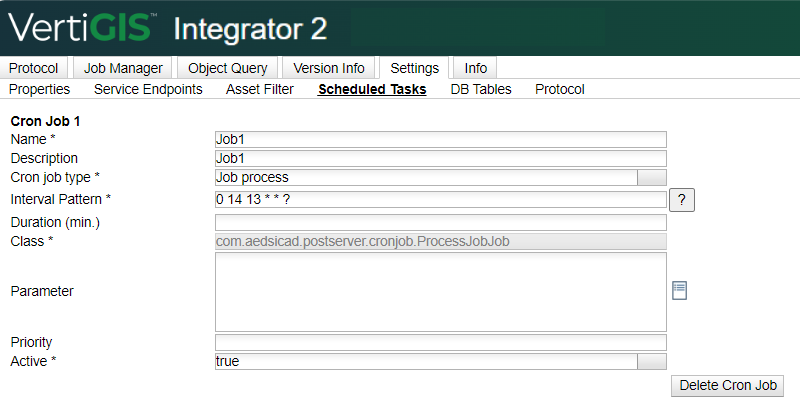
This Cron Job supports the following additional parameters:
Parameter |
Value |
Required |
|---|---|---|
Duration (min.) |
Time duration of the interval in minutes (VertiGIS Networks Jobs will be processed only within the specified time interval). If this value is empty, all the VertiGIS Networks Jobs in the ready-to-process state will be processed. |
|
Target Service Endpoint |
Name of the feature service endpoint used to send data to the external system. Unless otherwise specified, the operation applies to all feature service endpoints including VertiGIS networks endpoints. |
|
Asset Filter ID |
Specifies the ID of the asset filter, required based on the selected processing class. e.g. mandatory for process class com.aedsicad.postserver.process.ProcessProRSP. Check the Asset Filter for more information. |
|
Parameter |
A JSON string containing properties that take precedence over those defined in the global settings page •process_class_name: oClass designated for handling processing tasks oe.g.: com.aedsicad.postserver.process.ProcessProRSP •process_type: not case sensitive oNothing: Neither reconciliation nor posting will be executed. oReconcile: Only the reconcile operation will be performed; posting will be skipped. oPost: Reconcile as well as post will be executed. •check_network_validation_before_post: true/false •validate_network_after_post: true/false •abort_if_conflict: true/false •conflict_detection: "byAttribute"/"byObject". obyAttribute: Column level obyObject: Row level •reconcile_retry_count: integer oIf not explicitly specified in this JSON string, the value defined for postserver.reconcile.retry.count in the properties.xml configuration file will be used. odefault is 0 •reconcile_retry_wait_seconds: integer oIf not explicitly specified in this JSON string, the value defined for postserver.reconcile.retry.wait_time in the properties.xml configuration file will be used. •reconcile_conflict_as_protocol_info: true/false oLog reconcile conflicts as informational messages rather than errors in the scheduled task protocol to prevent unnecessary failure flags and ensure smoother automation monitoring. Example: { "process_class_name": "com.aedsicad.postserver.process.ProcessProRSP", "process_type": "NOTHING", "check_network_validation_before_post": true, "validate_network_after_post": true, "abort_if_conflict": false, "conflict_detection": "byAttribute", "reconcile_retry_count": 1, "reconcile_retry_wait_seconds": 3, "reconcile_conflict_as_protocol_info" : true } |
|