This cron job identifies edits made between a specified past moment and the current date and time in the default branch version. These edits are then filtered based on the configured asset filter and forwarded to external systems.
The Process Branch Version is a technology based on the Esri functionality to recognize edits in the geodatabase.
"Versioning is a framework where multiple editors can work simultaneously on a single feature class in a highly isolated fashion, without creating copies of the data.
It tracks changes made to a database. This brings the ability to test new designs internally without affecting published data, the capability to monitor data evolution over time, and support project workflows implemented across many organizations.
Versioning offers the type of flexible data management framework that is required to meet availability and processing demands. "
To Branch or Not to Branch, Esri
Preparation: Before the first execution, the initial "from moment" must be defined. This can be done by clicking the Load button, which retrieves the current date and time as a template. You can then adjust this value to the desired starting point. Once finalized, the value can be saved using the Set button.
The job can be started manually using the Start Cron Job button or scheduled automatically based on the pattern defined in the "Interval Pattern" field.
You can learn more about the process branch version from the Overview of versioning and the What is branch versioning? articles.
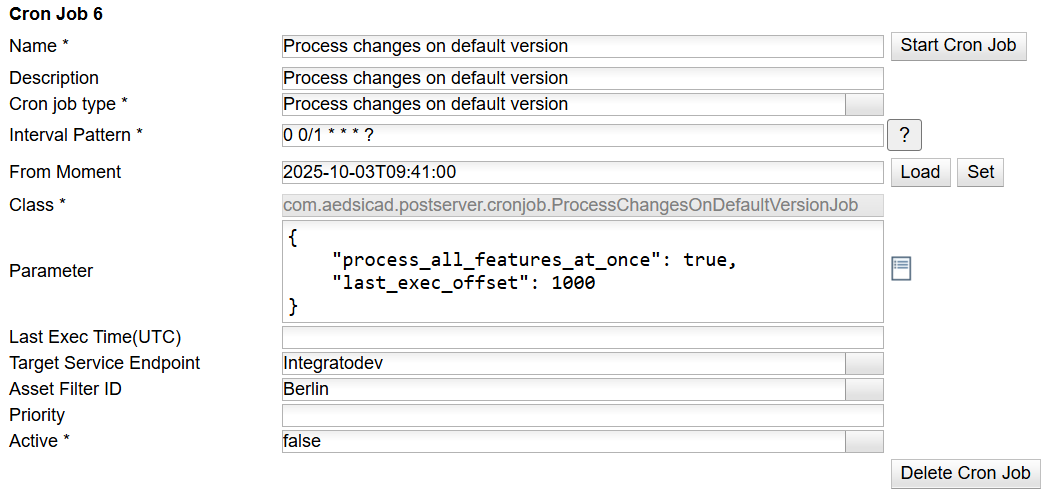
This Cron Job supports the following additional parameters:
Parameter |
Value |
Required |
|---|---|---|
From Moment |
After execution, the cron job stores the current date and time as the new reference point for the next run. This value can be viewed using the "Load" button and modified using the "Set" button next to the "From Moment" field. |
|
Asset Filter ID |
The "Asset Filter ID" defines which asset filter to apply by specifying its unique identifier. Check the Asset Filter for more information. |
X |
Target Service Endpoint |
The "Target Service Endpoint" is used to specify either the FeatureServiceOutbound or VertiGISNetworks endpoint, providing connection details for the ArcGIS Feature Service. |
X |
Parameter |
A JSON string containing properties that take precedence over those defined in the global settings page •process_all_features_at_once: true/false, optional, default = false oif true, all features will be sent via one protocol item •last_exec_offset: integer, optional, default=0 oSpecifies the number of milliseconds to subtract from the "from moment" to account for potential time discrepancies with the ArcGIS server. Example: { "process_all_features_at_once": true, "last_exec_offset": 2000 } |
|